nerdexam
Microsoft

MB-230 · Question #52

Drag and Drop Question You manage Dynamics 365 for Customer Service. You need to create a list of holidays and ensure that existing service-level agreements (SLAs) observe those holidays. Which three

Dynamics 365 Customer Service: Holiday Schedule & SLA Configuration The Correct Three-Step Sequence The correct three actions (in order) are: 1. Create a holiday schedule and holiday records (Item 6) 2. Create a customer service schedule and select the holiday schedule (Item 5) 3

manage entitlements and SLAs

Question

Drag and Drop Question You manage Dynamics 365 for Customer Service. You need to create a list of holidays and ensure that existing service-level agreements (SLAs) observe those holidays. Which three actions should you perform in sequence? To answer, move the appropriate actions from the list of actions to the answer area and arrange them in the correct order. Answer:

Exhibit
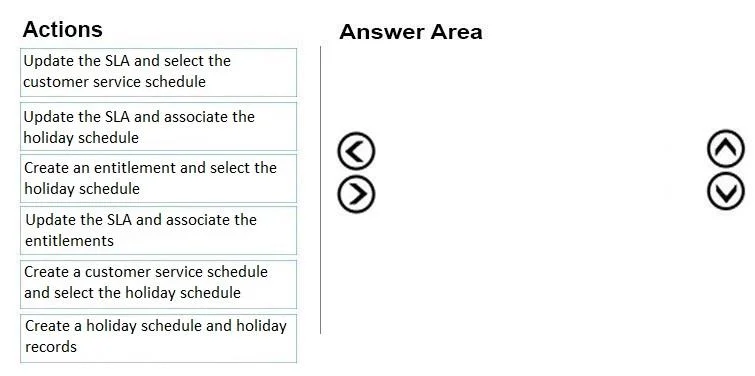
MB-230 question #52 exhibit

Options

  • Item 1Update the SLA and select the customer service schedule
  • Item 2Update the SLA and associate the holiday schedule
  • Item 3Create an entitlement and select the holiday schedule
  • Item 4Update the SLA and associate the entitlements
  • Item 5Create a customer service schedule and select the holiday schedule
  • Item 6Create a holiday schedule and holiday records

Explanation

Dynamics 365 Customer Service: Holiday Schedule & SLA Configuration

The Correct Three-Step Sequence

The correct three actions (in order) are:

  1. Create a holiday schedule and holiday records (Item 6)
  2. Create a customer service schedule and select the holiday schedule (Item 5)
  3. Update the SLA and select the customer service schedule (Item 1)

Why This Order?

The logic follows Dynamics 365's dependency chain: holidays → schedule → SLA. Each step creates something the next step depends on.

Step 1 - Item 6: Create a holiday schedule and holiday records

You must build the holiday schedule first because nothing else can reference it until it exists. A holiday schedule is a named container; holiday records (e.g., "New Year's Day - Jan 1") are added inside it. Without this, you have nothing to attach to a customer service schedule.

Step 2 - Item 5: Create a customer service schedule and select the holiday schedule

A customer service schedule defines business hours (e.g., Mon–Fri, 9–5). During creation or editing, you can associate it with a holiday schedule. This is the bridge: the schedule now knows which days are non-working. SLAs do not link directly to holiday schedules - they link to customer service schedules.

Step 3 - Item 1: Update the SLA and select the customer service schedule

Now update your existing SLA to reference the customer service schedule you just configured. The SLA will then automatically pause its KPI timers on days that appear in the associated holiday schedule.


Why the Other Items Are Wrong

ItemActionWhy it's a distractor
Item 2Update the SLA and associate the holiday scheduleSLAs cannot directly link to a holiday schedule - only to a customer service schedule
Item 3Create an entitlement and select the holiday scheduleEntitlements define support terms (channels, # of cases), not time-based SLA behavior; holiday schedules aren't applied here
Item 4Update the SLA and associate the entitlementsThis relates to a different workflow (linking SLAs to entitlement templates), not holiday observance

Common Misconceptions

  • "You can skip the customer service schedule" - No. SLAs require a customer service schedule as the intermediary; you cannot attach a holiday schedule to an SLA directly.
  • "Entitlements control holiday behavior" - Entitlements define what support a customer gets, not when SLA clocks pause.
  • "Existing SLAs automatically pick up new holidays" - No. You must explicitly update the SLA to point to the schedule that includes the holiday schedule.

Topics

#holiday schedule#SLA configuration#customer service schedule#business hours

Community Discussion

No community discussion yet for this question.

Full MB-230 Practice