nerdexam
Microsoft

MB-230 · Question #54

Drag and Drop Question You are a Dynamics 365 for Customer Service administrator. Your company requires a new phone-to-case business process flow for customer service representatives to follow. The st

The correct answer is Create a new business process flow record for the case entity.; Create and activate the case-acknowledgement email workflow as follows: In Available to run, select Run this workflow in the background and As a child process.; Create and activate the process flow with each of the stages. Add the case acknowledgement email workflow to the acknowledgement-and-research stage.. Dynamics 365: Phone-to-Case Business Process Flow - Explanation --- Why This Order? The three steps form a strict dependency chain: you can't configure what doesn't exist yet. Each step is a prerequisite for the next. --- Step-by-Step Breakdown Step 1: Create a new business proce

Manage cases in Customer Service

Question

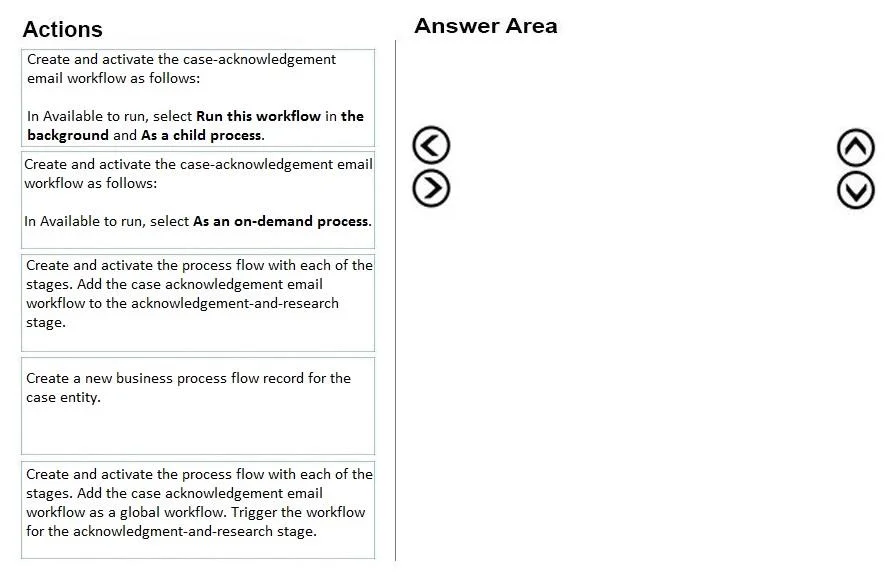
Drag and Drop Question You are a Dynamics 365 for Customer Service administrator. Your company requires a new phone-to-case business process flow for customer service representatives to follow. The stages are as follows: 1. Verification 2. Acknowledgement and research 3. Resolution Customer service representatives must send an email to the customer when a case enters the acknowledgement-and-research stage. You need to create the required business process flow and components. Which three actions should you perform in sequence? To answer, move the appropriate actions from the list of actions to the answer area and arrange them in the correct order. Answer:

Exhibit
MB-230 question #54 exhibit

Answer Area

Drag items

Create and activate the case-acknowledgement email workflow as follows: In Available to run, select Run this workflow in the background and As a child process.Create and activate the case-acknowledgement email workflow as follows: In Available to run, select As an on-demand process.Create and activate the process flow with each of the stages. Add the case acknowledgement email workflow to the acknowledgement-and-research stage.Create a new business process flow record for the case entity.Create and activate the process flow with each of the stages. Add the case acknowledgement email workflow as a global workflow. Trigger the workflow for the acknowledgement-and-research stage.

Correct arrangement

  • Create a new business process flow record for the case entity.
  • Create and activate the case-acknowledgement email workflow as follows: In Available to run, select Run this workflow in the background and As a child process.
  • Create and activate the process flow with each of the stages. Add the case acknowledgement email workflow to the acknowledgement-and-research stage.

Explanation

Dynamics 365: Phone-to-Case Business Process Flow - Explanation


Why This Order?

The three steps form a strict dependency chain: you can't configure what doesn't exist yet. Each step is a prerequisite for the next.


Step-by-Step Breakdown

Step 1: Create a new business process flow record for the case entity.

This is the container. In D365, a Business Process Flow (BPF) is itself a process record tied to a specific entity (here: Case). You must create this record first before you can define stages, add steps, or reference any workflows. Nothing else in the chain is possible without this existing first.


Step 2: Create and activate the case-acknowledgement email workflow - with "Run this workflow in the background" AND "As a child process."

Two settings matter here, and both are required:

  • "Run this workflow in the background" - This makes it asynchronous. Email sending should not block the UI or require user interaction; background execution is appropriate.
  • "As a child process" - This is the critical one. When a workflow needs to be called by another process (specifically, triggered by a BPF stage transition), it must be designated a child process. Without this flag, the BPF cannot invoke it as a stage step. The workflow must be created and activated before Step 3, because Step 3 references it by name.

Step 3: Create and activate the process flow with all three stages. Add the case-acknowledgement email workflow to the acknowledgement-and-research stage.

Now that the BPF record exists (Step 1) and the workflow is ready as a child process (Step 2), you can fully build out the BPF: define the Verification, Acknowledgement and Research, and Resolution stages, then attach the email workflow as a step inside the acknowledgement-and-research stage. Activating the BPF makes it available to reps.


Why the Rejected Items Are Wrong

Rejected ItemWhy It's Wrong
"As an on-demand process"On-demand workflows require a user to manually trigger them. The requirement is automatic email on stage entry - this defeats the automation.
"Add as a global workflow; trigger for the stage"Global workflows fire on entity record events (create, update, field change), not on BPF stage transitions. You cannot reliably fire a global workflow specifically when a stage is entered this way. The correct pattern is attaching it directly as a step within the stage.

Common Mistakes

  1. Skipping Step 1 - Candidates sometimes jump to building stages without realizing the BPF itself is a record that must be created first.
  2. Choosing "on-demand" over "child process" - These sound similar but behave completely differently. On-demand = user clicks a button. Child process = another process calls it programmatically.
  3. Using a global workflow - This is a tempting distraction because global workflows can send emails, but they can't be scoped to a BPF stage entrance reliably. Stage-level workflow steps are the correct mechanism.
  4. Building the BPF before the workflow exists - You must reference the workflow when configuring the stage step, so the workflow must be activated first.

Topics

#business process flow#workflow automation#case stages#child process workflow

Community Discussion

No community discussion yet for this question.

Full MB-230 Practice