
MB-230 · Question #423
Drag and Drop Question A company uses Customer Service. The company plans to enable a customer service agent in Omnichannel. You need to identify the security roles that are required for the bot…
The correct answer is Omnichannel agent; Productivity tools user. Explanation: Security Roles for a Bot User in Omnichannel This question is about Microsoft Dynamics 365 Omnichannel for Customer Service. When you integrate a bot (e.g., a Copilot Studio/Power Virtual Agents bot) as an agent in Omnichannel, you must create an application user…
Question
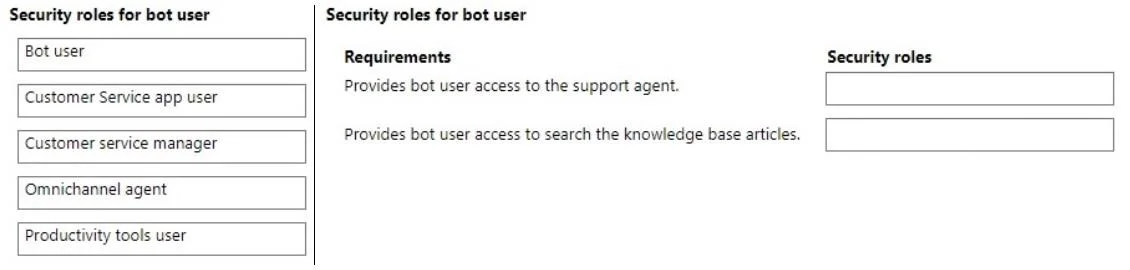
Drag and Drop Question A company uses Customer Service. The company plans to enable a customer service agent in Omnichannel. You need to identify the security roles that are required for the bot user. What should you identify? To answer, move the appropriate security roles to the correct requirements. You may use each security role once, more than once, or not at all. You may need to move the split bar between panes or scroll to view content. NOTE: Each correct selection is worth one point. Answer:
Exhibit
Answer Area
Drag items
Correct arrangement
- Omnichannel agent
- Productivity tools user
Explanation
Explanation: Security Roles for a Bot User in Omnichannel
This question is about Microsoft Dynamics 365 Omnichannel for Customer Service. When you integrate a bot (e.g., a Copilot Studio/Power Virtual Agents bot) as an agent in Omnichannel, you must create an application user representing the bot and assign it the correct security roles so it can function as an automated agent.
Correct Roles and Why
1. Omnichannel agent
- This role grants the bot user the ability to be assigned to Omnichannel queues and handle routed conversations.
- Without this role, the system cannot treat the bot as a valid agent - it won't receive work items or participate in conversation routing.
- This is the foundational role for any entity (human or bot) that handles customer interactions in Omnichannel.
2. Productivity tools user
- This role is required for the bot to access productivity tool features embedded in the Omnichannel environment.
- Microsoft's official documentation explicitly lists this as a required role alongside "Omnichannel agent" for bot application users.
- Without it, the bot user lacks the access level needed to operate fully within the Omnichannel framework.
Why the Other Options Are Wrong
| Role | Reason NOT Required for Bot User |
|---|---|
| Bot user | This is the entity (application user) you're assigning roles to, not a security role itself. It's the subject of the question, not an answer. |
| Customer Service app user | Intended for human agents accessing the Customer Service Hub app - not needed for an automated bot. |
| Customer service manager | A supervisory/administrative role - granting this to a bot would be over-privileged and incorrect. |
Common Mistakes
- Selecting "Bot user" as a role: Candidates confuse the bot user account with a security role named "Bot user." The bot user is what you're configuring, not what you assign.
- Omitting "Productivity tools user": People often think only "Omnichannel agent" is needed, but Microsoft requires both for the bot to function correctly in the Omnichannel environment.
- Adding "Customer Service app user": This seems intuitive but applies to human users of the Customer Service app, not bot agents in Omnichannel.
Topics
Community Discussion
No community discussion yet for this question.