nerdexam
Microsoft

MB-230 · Question #255

Drag and Drop Question You are implementing Omnichannel for Customer Service for a call center. The call center's requirements for the implementation are as follows: - When a new chat conversation is

The correct answer is Anchor Tab in Session Template; Session Template. Omnichannel Tab Configuration - Explanation Core Concepts to Understand First In Dynamics 365 Omnichannel for Customer Service, a Session Template defines the workspace that opens when a conversation starts. Within it, there are two kinds of tabs: | Type | Closable by Agent? | Pr

implement multi-session experiences for Customer Service

Question

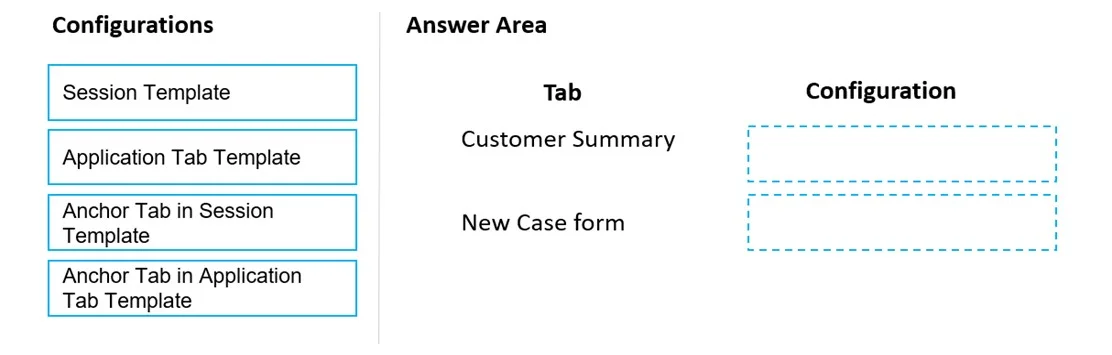
Drag and Drop Question You are implementing Omnichannel for Customer Service for a call center. The call center's requirements for the implementation are as follows: - When a new chat conversation is started, the Customer Summary and New Case form tabs must be open. - The Customer Summary tab must be the primary tab during the conversation. - Agents must be able to close the New Case form tab. - Agents must not be able to close the Customer Summary tab. You need to configure the tabs. Which configuration should you use for each tab? To answer, drag the appropriate types of account information to the correct SMS channel provider. Each type of account information may be used once, more than once, or not at all. You may need to drag the split bar between panes or scroll to view content. NOTE: Each correct selection is worth one point. Answer:

Exhibit
MB-230 question #255 exhibit

Answer Area

Drag items

Session TemplateApplication Tab TemplateAnchor Tab in Session TemplateAnchor Tab in Application Tab Template

Correct arrangement

  • Anchor Tab in Session Template
  • Session Template

Explanation

Omnichannel Tab Configuration - Explanation

Core Concepts to Understand First

In Dynamics 365 Omnichannel for Customer Service, a Session Template defines the workspace that opens when a conversation starts. Within it, there are two kinds of tabs:

TypeClosable by Agent?Primary Tab?
Anchor TabNoYes (always)
Additional tabsYesNo

Item Placements

1. Customer Summary tab → Anchor Tab in Session Template

Requirements met: Must be the primary tab. Must NOT be closable.

The Anchor Tab is a designated slot inside the Session Template that is permanently pinned. It is:

  • Always in focus when the session opens (satisfying "primary tab")
  • Impossible for the agent to close (satisfying "must not close")

There is exactly one anchor tab per session template. The Customer Summary is the natural fit - it's the persistent reference point throughout the conversation.

2. New Case form tab → Session Template

Requirements met: Must open automatically. Must be closable.

Additional tabs listed in the Session Template (beyond the anchor) open automatically with the session but remain closable by the agent. Assigning the New Case form here satisfies both requirements.


Why the Other Options Are Wrong

  • Application Tab Template - This is a reusable tab definition, not a placement mechanism. It defines what a tab shows, not how it behaves in a session. You reference it from a session template; you don't assign it directly.
  • Anchor Tab in Application Tab Template - This combination doesn't exist. Anchor tabs are a property of Session Templates only, not of Application Tab Templates.

Common Mistakes

  1. Using Application Tab Template as the answer for New Case form - candidates confuse the template definition with the session placement.
  2. Thinking both tabs use "Anchor Tab" - only one anchor tab is allowed per session, and it must be the non-closable primary tab.
  3. Overlooking that "closable" is the key differentiator - the requirement that agents can close New Case but cannot close Customer Summary is what drives the entire configuration choice.

Topics

#session templates#anchor tab#application tab templates#Omnichannel workspace

Community Discussion

No community discussion yet for this question.

Full MB-230 Practice