MB-230 · Question #404
Drag and Drop Question A company uses Dynamics 365 Customer Service. Help desk representatives must be able to open multiple sessions. Each representative must have the same application experience…
The correct answer is App profile manager; Smart assist. Dynamics 365 Customer Service: Drag-and-Drop Explanation Understanding the Requirements The scenario presents three distinct needs: | # | Requirement | Answer | |---|-------------|--------| | 1 | Open multiple sessions | App profile manager | | 2 | Same application experience…
Question
Drag and Drop Question A company uses Dynamics 365 Customer Service. Help desk representatives must be able to open multiple sessions. Each representative must have the same application experience when logging into the application. Agents must provide a standard response depending on what the customer issue is when someone calls in for support. The standardized response must use the same language each time. You need to configure the required features. What should you configure? To answer, drag the appropriate configurations to the correct requirements. Each configuration may be used once, more than once, or not at all. You may need to drag the split bar between panes or scroll to view content. NOTE: Each correct selection is worth one point. Answer:
Exhibit
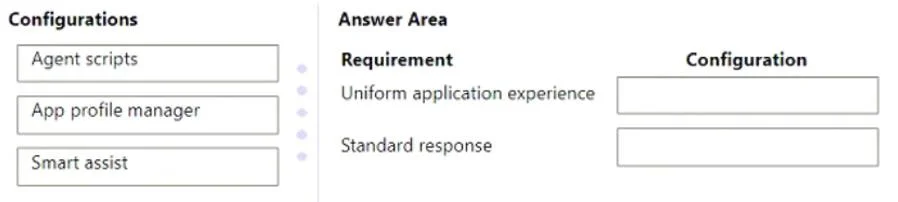
Answer Area
Drag items
Correct arrangement
- App profile manager
- Smart assist
Explanation
Dynamics 365 Customer Service: Drag-and-Drop Explanation
Understanding the Requirements
The scenario presents three distinct needs:
| # | Requirement | Answer |
|---|---|---|
| 1 | Open multiple sessions | App profile manager |
| 2 | Same application experience across all reps | App profile manager |
| 3 | Standardized response based on customer issue | Smart assist |
Item-by-Item Breakdown
1. App profile manager
What it does: Defines workspace configurations - which channels, sessions, and tools are available, and how the app looks and behaves for a group of users.
Why it fits here (twice):
- Multiple sessions: Multi-session capability is enabled directly within an app profile. Without assigning a multi-session profile, reps are limited to a single session.
- Consistent experience: Every rep assigned to the same profile gets an identical app layout, navigation, and toolset at login. This is the purpose of app profiles - standardize the agent workspace.
2. Smart assist
What it does: Uses AI to analyze the ongoing conversation in real time and surface relevant suggestions (knowledge articles, similar cases, macros) to the agent.
Why it fits here: "A standard response depending on what the customer issue is" implies the response selection is context-driven - Smart assist detects what the customer is saying and recommends the appropriate pre-configured response or article automatically.
Common Misconception: Why Not Agent Scripts?
Agent scripts is the most tempting wrong answer here. Agent scripts do enforce consistent language and provide step-by-step scripted responses. However:
- Agent scripts require the agent to manually select or trigger the appropriate script
- Smart assist automatically surfaces the right response based on conversation context
- The phrasing "depending on what the customer issue is" signals dynamic, context-aware delivery - which is Smart assist's core function
Rule of thumb: If the question emphasizes the system detecting the issue and responding accordingly, think Smart assist. If it emphasizes agents following a pre-written script they select manually, think Agent scripts.
Summary
- App profile manager = session configuration + uniform UX across all reps
- Smart assist = AI-driven, context-aware response recommendations
- Agent scripts = plausible distractor, but it's manual rather than automatically triggered by customer issue type
Topics
Community Discussion
No community discussion yet for this question.
