MB-230 · Question #195
Drag and Drop Question You are setting up Omnichannel for Customer Service. You need to automate the following tasks to make it easier and quicker for representatives to assist customers…
The correct answer is Macros; Agent scripts; Smart assist. Omnichannel for Customer Service - Tool Placement Explained --- Requirement 1: One-step process to send a predefined email after helping a customer Answer: Macros Why: Macros are single-click automation sequences that execute multiple predefined actions in one step. An agent…
Question
Drag and Drop Question You are setting up Omnichannel for Customer Service. You need to automate the following tasks to make it easier and quicker for representatives to assist customers:
- Establish a one-step process to send a predefined email to customers
once a representative is done helping them.
- Ensure that representatives ask predefined questions to identify a
customer before troubleshooting a case.
- Have chatbots available to help make recommendations in typed
conversations. Which tools should you use? To answer, drag the appropriate tools to the correct requirements. Each tool may be used once, more than once, or not at all. You may need to drag the split bar between panes or scroll to view content. Answer:
Exhibit
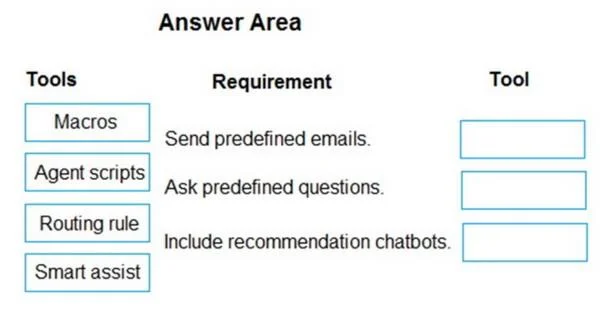
Answer Area
Drag items
Correct arrangement
- Macros
- Agent scripts
- Smart assist
Explanation
Omnichannel for Customer Service - Tool Placement Explained
Requirement 1: One-step process to send a predefined email after helping a customer
Answer: Macros
Why: Macros are single-click automation sequences that execute multiple predefined actions in one step. An agent clicks a macro, and it automatically opens the email template, populates fields, and sends it - no manual steps. The key phrase here is "one-step process" combined with a specific automated action (sending an email). Macros are built exactly for this: trigger once, execute a predefined workflow.
Requirement 2: Representatives ask predefined questions to identify a customer before troubleshooting
Answer: Agent scripts
Why: Agent scripts provide step-by-step guided instructions displayed to the agent during a conversation. They can include scripted questions, decision trees, and procedural steps - ensuring every agent follows the same process. The key phrase here is "predefined questions" used in a guided, sequential flow before troubleshooting begins. Macros perform actions; agent scripts guide agent behavior.
Common misconception: People often confuse Macros and Agent scripts. Macros do things automatically. Agent scripts guide agents through a process. An agent script can even call a macro as one of its steps.
Requirement 3: Chatbots making recommendations in typed conversations
Answer: Smart assist
Why: Smart assist is an AI-powered panel that appears in the agent's conversation interface and provides real-time recommendations - such as knowledge articles or suggested responses - during active typed (chat) conversations. It integrates with bots and AI models to surface contextual suggestions as the conversation unfolds.
Common misconception: Smart assist isn't a customer-facing chatbot - it's an agent-side AI advisor. It assists the representative, not the customer directly.
Why "Routing rule" is not used
Routing rules direct incoming conversations to the correct queue or agent based on conditions (e.g., language, issue type). They handle work distribution, not agent workflow, automation, or recommendations - so they don't fit any of the three requirements.
Summary Table
| Requirement | Tool | Core reason |
|---|---|---|
| One-step email after resolution | Macros | Single-click automated action execution |
| Predefined identification questions | Agent scripts | Guided step-by-step agent workflow |
| Bot recommendations in chat | Smart assist | Real-time AI recommendations during typed conversations |
Topics
Community Discussion
No community discussion yet for this question.
