
MB-230 · Question #171
Drag and Drop Question A company uses Dynamics 365 Customer Service. You are configuring Knowledge Management capabilities for the company. The company works frequently with not-for-profit agencies…
The correct answer is Navigate to the Microsoft Power Platform admin center.; Add an Account record type.; Enable automatic search for Address 1: Country/Region. Dynamics 365 Knowledge Management - Configuration Sequence Explained The Scenario in Plain Terms You need Knowledge Management to automatically suggest articles based on an agency's country/region. Agencies are organizations (not-for-profit agencies), and you need the search to…
Question
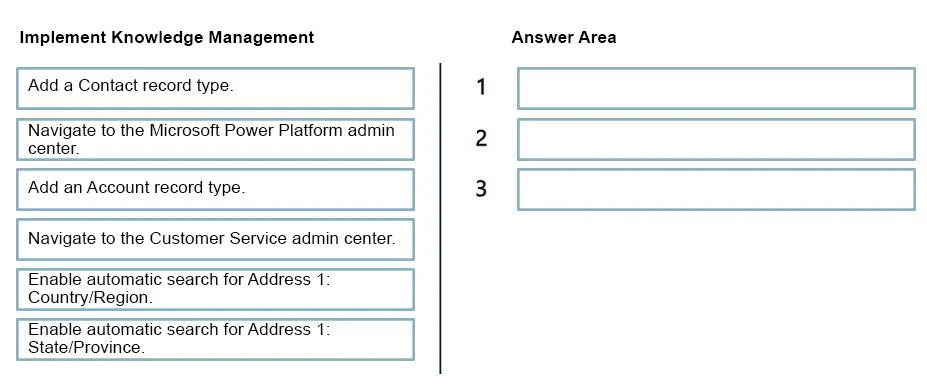
Drag and Drop Question A company uses Dynamics 365 Customer Service. You are configuring Knowledge Management capabilities for the company. The company works frequently with not-for-profit agencies that are based in various countries/regions. The company requires the ability to use Knowledge Management capabilities to provide article suggestions based on the location of each agency in a country/region. You need to implement Knowledge Management to meet the requirements. Which three actions should you perform in sequence? To answer, move the appropriate actions from the list of actions to the answer area and arrange them in the correct order. Answer:
Exhibit
Answer Area
Drag items
Correct arrangement
- Navigate to the Microsoft Power Platform admin center.
- Add an Account record type.
- Enable automatic search for Address 1: Country/Region.
Explanation
Dynamics 365 Knowledge Management - Configuration Sequence Explained
The Scenario in Plain Terms
You need Knowledge Management to automatically suggest articles based on an agency's country/region. Agencies are organizations (not-for-profit agencies), and you need the search to trigger on the country/region field of their address.
Step-by-Step Breakdown
Step 1: Navigate to the Microsoft Power Platform admin center
Why first, and why this center (not Customer Service admin center)?
Knowledge Management's embedded search configuration - specifically setting up which record types participate in knowledge search and which fields drive automatic suggestions - is managed at the environment level. The Power Platform admin center is the correct entry point for these environment-level settings in Dynamics 365. The Customer Service admin center handles agent-facing and case management configuration, but the underlying Knowledge Management search settings live in the Power Platform admin layer.
Common mistake: Candidates choose "Navigate to Customer Service admin center" first. While Customer Service admin center handles many Knowledge settings, the automatic field-based search configuration is accessed through the Power Platform admin center.
Step 2: Add an Account record type
Why Account, not Contact?
Agencies are organizations - they map to the Account entity in Dynamics 365. The Contact record type represents individual people, not organizations. Since the requirement is about not-for-profit agencies (i.e., organizations based in various countries), you must add Account as the record type to enable knowledge search against their records.
You add the record type before configuring fields because the field options in Step 3 are only available after the record type is registered.
Common mistake: Choosing Contact. The word "agency" clearly signals an organization → Account, not an individual → Contact.
Step 3: Enable automatic search for Address 1: Country/Region
Why Country/Region, not State/Province?
The requirement is explicit: suggestions must be based on "the location of each agency in a country/region." The field Address 1: Country/Region directly captures this. Enabling automatic search on this field tells the system to use the agency's country as a trigger for surfacing relevant knowledge articles.
Address 1: State/Province would narrow results to a sub-national level, which is not what the requirement asks for.
Common mistake: Selecting State/Province because it seems geographically relevant. Always match the field to the stated granularity in the requirement - the requirement says "country/region," not state.
Why the Other Items Are Wrong
| Item | Why excluded |
|---|---|
| Add a Contact record type | Agencies = organizations = Account, not Contact |
| Enable automatic search for Address 1: State/Province | Requirement specifies country/region, not state |
| Navigate to Customer Service admin center | This is for case/agent config, not the correct entry point for this specific setting |
Key Takeaway
The logic flows as: access the right admin layer → register the right entity → configure the right field. Each step depends on the previous one - you cannot configure fields without a record type, and you cannot add record types without being in the correct admin context.
Topics
Community Discussion
No community discussion yet for this question.