MB-230 · Question #168
Drag and Drop Question A company has a Customer Service deployment. The company plans to provide instructions for customer service agents. You need to apply the security roles for agents to…
The correct answer is Productivity tools administrator; Productivity tools user. Drag-and-Drop Answer: Agent Script Security Roles Context In Dynamics 365 Customer Service, agent scripts are part of the Productivity tools feature set. Two distinct requirements exist: someone must configure scripts, and agents must access/use them. These map to separate…
Question
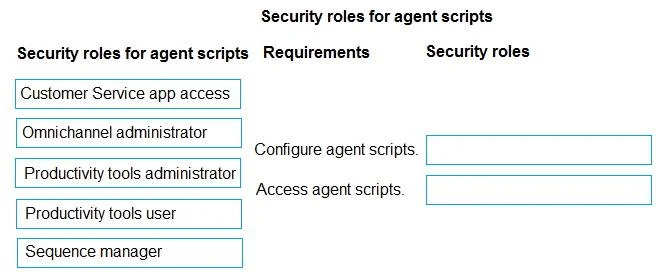
Drag and Drop Question A company has a Customer Service deployment. The company plans to provide instructions for customer service agents. You need to apply the security roles for agents to configure and access agent scripts. Which security roles should you use? To answer, move the appropriate security roles to the correct requirements. You may use each security role once, more than once, or not at all. You may need to move the split bar between panes or scroll to view content. NOTE: Each correct selection is worth one point. Answer:
Exhibit
Answer Area
Drag items
Correct arrangement
- Productivity tools administrator
- Productivity tools user
Explanation
Drag-and-Drop Answer: Agent Script Security Roles
Context
In Dynamics 365 Customer Service, agent scripts are part of the Productivity tools feature set. Two distinct requirements exist: someone must configure scripts, and agents must access/use them. These map to separate security roles.
Placement Breakdown
Requirement 1 - Configure agent scripts → Productivity tools administrator
This role grants permissions to create, edit, and manage agent scripts, macros, and the productivity pane settings. Only a user with this role can author and publish scripts for agents to use. Without it, no configuration UI is accessible.
Requirement 2 - Access/use agent scripts → Productivity tools user
This role grants frontline agents the ability to view and run agent scripts during customer interactions. It is the minimum role a customer service rep needs to see the productivity pane and follow script steps. It does not grant any configuration capability.
Why the Other Roles Are Wrong
| Role | Why Not Used |
|---|---|
| Customer Service app access | Grants general app access but no specific productivity tool permissions |
| Omnichannel administrator | Manages queues, workstreams, channels - not agent scripts specifically |
| Sequence manager | A Dynamics 365 Sales role for sales sequences; irrelevant here |
Common Misconceptions
- "Omnichannel administrator can configure scripts" - Incorrect. That role manages routing and channels, not productivity tools. Productivity tools have their own admin role.
- "Agents only need Customer Service app access" - Incorrect. App access alone does not surface the agent script pane;
Productivity tools useris required separately. - "One role covers both configure and access" - Incorrect. Microsoft deliberately separates admin (configure) from user (access) for principle of least privilege.
Topics
Community Discussion
No community discussion yet for this question.
