
Microsoft
MB-230 · Question #121
Case Study 1 - Humongous Insurance Background Humongous Insurance is contracted to process all insurance claims for a health facility that accepts the following types of health insurance: Health…
Sign in or unlock MB-230 to reveal the answer and full explanation for question #121. The question stem and answer options stay visible for context.
manage cases and Knowledge Management
Question
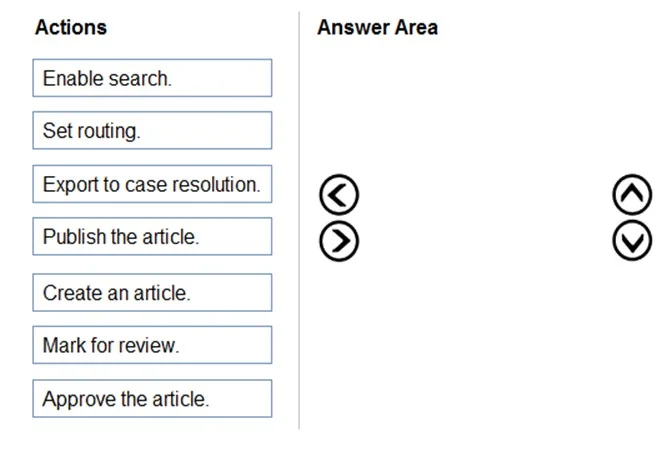
Case Study 1 - Humongous Insurance Background Humongous Insurance is contracted to process all insurance claims for a health facility that accepts the following types of health insurance: Health maintenance organization (HMO) Preferred-provider organization (PPO) Gold Cases are classified as new claims, claim disputes, and follow-ups. Each insured person is entitled to open 25 new cases each calendar year. Support representatives specialize by and process claims by insurance type. Humongous Insurance currently accepts claims only by telephone. The call center is open from 06:00 GMT to 24:00 GMT daily. Call center staff work one of the following shifts: 06:00 GMT to 12:00 GMT, 12:00 GMT to 18:00 GMT, and 18:00 GMT to 24:00 GMT. When a case is received by email, a staff member categorizes the case as email and closes the case immediately. Current environment Humongous Insurance has three departments to handle claim types: HMO, PPO, and Gold. The company uses handwritten forms to send claims information to the correct department. Each department maintains a workbook to record calls received. Requirements. Support desk Configure the system to track the number of insurance claims filed each year. Categorize claims by type as they are opened. Configure the system to track staff responsiveness to service-level agreements (SLAs). Ensure that business hours reflect the hours that support staff are scheduled. Requirements. Case handling All new cases must be automatically placed into a queue based on insurance type after the type is selected. All insurance types need to be automatically moved to the proper queue when the subject is picked. All cases must be created and closed immediately when received. The status reason must be set to Email Sent or Phone Call. Information must be restricted by insurance and phone call type. Managers must be alerted when customers reach their limit of 25 cases for the year. Changes to cases must not be counted against entitlements until the case is closed. Requirements. Disputes Claim disputes must be categorized as low priority. The status for all disputed cases must be set to Review by a Manager before a disputed case may be closed. Requirements. Knowledge base A knowledge base must be used as a repository for all answers. Representatives must be able to search the knowledge base when opening a new case for similar claims. Representatives must be able to search across all entities at all times. Searches must check any field in the entity for matches in a single search. Searches must return results in a single list and sort the list so that the most relevant results appear at the top of the list. Representatives must be able to link the knowledge base to cases when applicable. Representatives must create a new knowledge base article if an answer is not found in the existing knowledge base. Representatives must be able to use SQL-like syntax to search the knowledge base. Requirements. Service-level agreements When a customer calls to open a claim, the company must respond to the caller within the following time frames: Requirements. Alerts Cases must be flagged when they are past the SLA threshold. An email alert must be sent to the manager to indicate an SLA noncompliance. An email alert must be sent to representatives for SLA violations as follows: HMO 2 hours prior and PPO 1 hour prior. Send an email alert to support managers when disputes are ready to be closed. Send an email alert to customers when cases are closed. Requirements. Issues The current process is all manual and not efficient. There is no easy way to determine whether the company is meeting its SLAs. Representatives are often inconsistent regarding how they handle customers and answer customer questions. There is no accountability for any of the representatives who take calls. Drag and Drop Question You need to configure the system to store answers about claims. Which four actions should you perform in sequence? To answer, move all actions from the list to the answer area and arrange them in the correct order. Answer:
Exhibit
Answer Area
Drag items
Enable search.Set routing.Export to case resolution.Publish the article.Create an article.Mark for review.Approve the article.
Unlock MB-230 to see the answer
You've previewed enough free MB-230 questions. Unlock MB-230 for full answers, explanations, the timed quiz mode, progress tracking, and the master PDF. Question stem and options stay visible so you can still see what's on the exam.
Topics
#knowledge article lifecycle#article publishing#article approval#knowledge base