
CSA · Question #89
Which icon would you double click, to expand and collapse the list of all Applications and Modules?
The correct answer is C. Application. The Application Navigator uses an "Application" icon (often represented as a left-facing arrow or hamburger menu) to expand or collapse the list of applications and their modules.
Question
Which icon would you double click, to expand and collapse the list of all Applications and Modules?
Exhibit
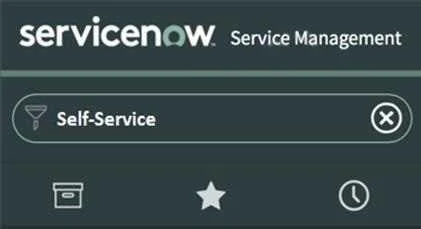
Options
- AStar
- BClock
- CApplication
- DFunnel
How the community answered
(54 responses)- A2% (1)
- B4% (2)
- C87% (47)
- D7% (4)
Why each option
The Application Navigator uses an "Application" icon (often represented as a left-facing arrow or hamburger menu) to expand or collapse the list of applications and their modules.
The Star icon is used for marking favorites, not for expanding/collapsing the Application Navigator.
The Clock icon typically indicates recent items or history within the platform.
The "Application" icon, typically a left-facing arrow or a "hamburger" menu (three horizontal lines), is located at the top left of the ServiceNow UI. Double-clicking or clicking this icon expands and collapses the Application Navigator, which displays the list of applications and their associated modules.
The Funnel icon is commonly associated with filtering options, not navigation expansion.
Concept tested: ServiceNow UI Application Navigator control
Source: https://docs.servicenow.com/bundle/utah-platform-user-interface/page/use/navigation/concept/c_TheApplicationNavigator.html
Topics
Community Discussion
No community discussion yet for this question.