
220-1201 · Question #168
SIMULATION 9 An office manager reports that a printer is experiencing performance issues. Printouts are smudging when they are handled and recently whenever they need to print legal sized documents…
Simulation 9: Printer Troubleshooting Explanation Overall Goal Two distinct problems are reported, each pointing to a different faulty component: 1. Smudging on printouts -> Fuser failure 2. Paper jams only on legal-size paper -> Tray 3 pickup/feed rollers failure The correct…
Question
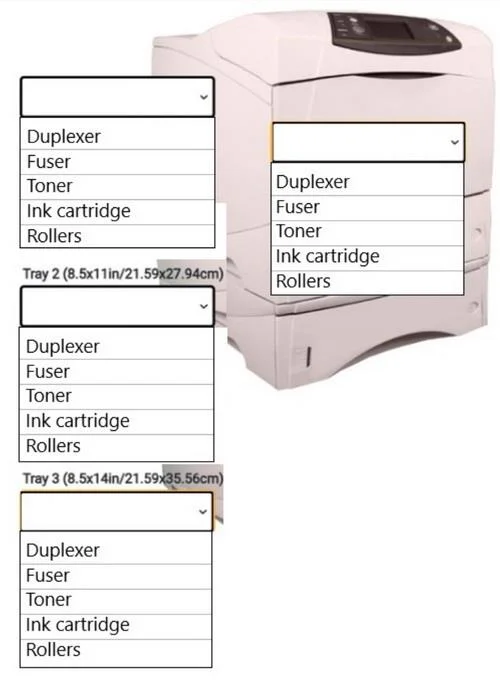
SIMULATION 9 An office manager reports that a printer is experiencing performance issues. Printouts are smudging when they are handled and recently whenever they need to print legal sized documents, the paper jams before anything is printed on it. The following paper sizes are used:
Letter (8.5x11in/21.59x27.94cm) Legal (8.5x14in/21.59x35.56cm) Oversized(11x17in/27.94x43.18cm) INSTRUCTIONS Using the dropdown menus, select from the available printer parts to replace only the faulty components on the office printer to resolve the stated issues. If at any time you would like to bung back me initial state or me simulation, please click me Reset All button. Answer:
Exhibit
Explanation
Simulation 9: Printer Troubleshooting Explanation
Overall Goal
Two distinct problems are reported, each pointing to a different faulty component:
- Smudging on printouts -> Fuser failure
- Paper jams only on legal-size paper -> Tray 3 pickup/feed rollers failure
The correct approach is to replace only the faulty components - not the entire printer or unrelated parts. This is a classic "minimum intervention" diagnostic principle.
Step 1: Replace the Fuser
Why the fuser? Laser printers work in two stages: the toner is electrostatically applied to the page, then the fuser uses heat and pressure to permanently bond (melt) that toner into the paper fibers. If the fuser is worn or malfunctioning, it cannot generate sufficient heat/pressure, so the toner sits loosely on the surface and smears when touched.
Smudging is the textbook symptom of a failing fuser. No other component causes this - if the problem were the drum or toner cartridge, you'd see streaks, voids, or incorrect colors, not smearing.
What if you skip this? The printouts will continue to smear regardless of any other fix. The toner will never properly bond to the paper.
Step 2: Replace the Rollers in Tray 3 (Legal, 8.5Ã-14 in)
Why Tray 3 rollers? Paper trays use pickup rollers (to grab the sheet) and feed/separation rollers (to advance it without double-feeding). These rollers wear out over time, losing the grip and friction needed to move paper reliably.
The critical clue here is specificity: jams occur only on legal-size paper, and only before anything is printed. This means:
- The jam happens at the paper feed stage, not inside the printer (ruling out the fuser or paper path rollers)
- It's isolated to one tray (Tray 3, which holds legal paper), ruling out a global paper path problem
- Letter and oversized paper work fine, so only Tray 3's rollers are worn
Worn rollers on Tray 3 can't grip the longer legal sheet consistently, causing it to misfeed or skew and jam before reaching the imaging area.
What if you skip this? Legal-size print jobs will continue to jam. Replacing only the fuser would fix smudging but leave this problem untouched.
What if you replaced rollers in the wrong tray? Letter and oversized paper are unaffected - replacing their tray rollers wastes parts and doesn't solve anything.
What Would Go Wrong Out of Order?
Order doesn't critically matter here since these are two independent components. However, replacing rollers without replacing the fuser would produce jam-free legal printouts that still smear - incomplete fix. Always address all reported symptoms.
Memory Tip
"Smear = Fuser Fear; Jam in one tray = Rollers that day"
- Smudging/smearing after printing -> always suspect the fuser (heat/pressure bonding failure)
- Tray-specific jams before printing -> always suspect that tray's rollers (grip/feed failure)
These are two of the most commonly tested printer hardware failures on the CompTIA A+ exam.
Topics
Community Discussion
No community discussion yet for this question.