
PL-500 · Question #99
Drag and Drop Question You are developing desktop flows for a company. You need to use Recorder to record steps that you are performing in target applications. Which recording modes will Recorder…
The correct answer is Standard; Web; Image based; Standard. This question tests the ability to correctly identify and match Power Automate Desktop recording modes (Standard, Image based, Web) to specific target application types, demonstrating knowledge of their appropriate use cases.
Question
Drag and Drop Question You are developing desktop flows for a company. You need to use Recorder to record steps that you are performing in target applications. Which recording modes will Recorder use? To answer, drag the appropriate recording modes to the correct target applications. Each recording mode may be used once, more than once, or not at all. You may need to drag the split bar between panes or scroll to view content. NOTE: Each correct selection is worth one point. Answer:
Exhibit
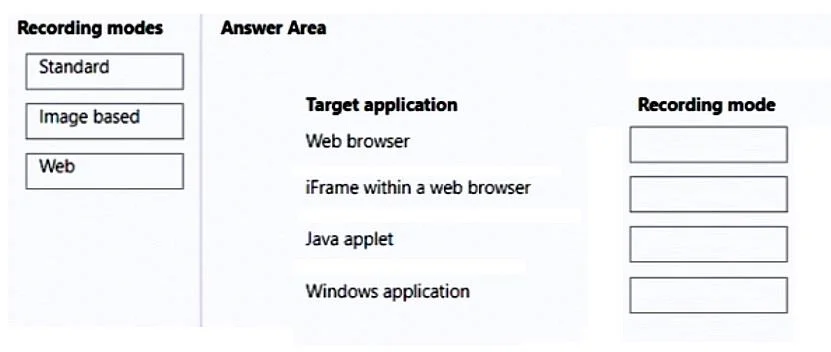
Answer Area
Drag items
Correct arrangement
- Standard
- Web
- Image based
- Standard
Explanation
This question tests the ability to correctly identify and match Power Automate Desktop recording modes (Standard, Image based, Web) to specific target application types, demonstrating knowledge of their appropriate use cases.
Approach. To answer correctly, drag the appropriate recording mode from the left pane to its matching target application slot in the right pane. The correct mappings are based on the capabilities and intended use of each Power Automate Desktop recording mode:
- Web browser -> Standard: The Standard (Desktop) recorder in Power Automate is capable of interacting with standard web browser elements, especially for general navigation and form filling where elements are well-defined in the UI automation tree.
- iFrame within a web browser -> Web: iFrames represent embedded web content. The Web recorder is specifically designed to interact with elements within web pages by understanding the HTML Document Object Model (DOM), making it the most robust choice for complex web structures like iFrames.
- Java applet -> Image based: Java applets are often legacy components that do not expose their UI elements in a way that standard UI automation frameworks (used by Standard or Web recorders) can reliably interpret. In such cases, image-based automation, which relies on visual recognition of elements, provides the most consistent and reliable interaction.
- Windows application -> Standard: The Standard (Desktop) recorder is the primary and most suitable mode for interacting with the UI elements of typical Windows desktop applications, recognizing controls and window elements directly.
Common mistakes.
- common_mistake. Common mistakes include misapplying the recording modes:
- Using 'Web' for Windows applications or 'Standard' for complex web scenarios: The Web recorder is specialized for browser DOM interactions and will struggle with desktop applications. While Standard can interact with some web elements, it's less robust for deeply embedded or dynamically loading web content (like iFrames) compared to the dedicated Web recorder.
- Attempting 'Standard' or 'Web' for Java applets: These recorders rely on UI element introspection, which often fails for legacy or custom UI frameworks like Java applets. This leads to unreliable automation or failure to identify elements.
- Overusing 'Image based': While critical for non-standard UIs, image-based automation is generally less robust and more sensitive to screen resolution or visual changes than UI-element-based automation (Standard/Web). Using it when Standard or Web would suffice is inefficient and creates more fragile flows.
- Confusing the general capabilities: The Standard recorder is a general-purpose desktop UI automation tool, whereas the Web recorder is specifically optimized for web browsers, and the Image-based recorder is a fallback for when other methods fail.
Concept tested. The core concept being tested is the understanding of different recording modes in Microsoft Power Automate Desktop (Standard/Desktop recorder, Web recorder, Image-based recorder) and their appropriate application based on the type of target application or UI element being automated.
Topics
Community Discussion
No community discussion yet for this question.