
PL-500 · Question #100
Drag and Drop Question You are designing automation processes. You need to configure the run mode for each automation scenario. Which run modes should you use? To answer, drag the appropriate run…
The correct answer is Attended; Unattended; Unattended. The question assesses understanding of Attended versus Unattended run modes in automation, requiring the selection of the correct mode for three distinct scenarios based on their characteristics.
Question
Drag and Drop Question You are designing automation processes. You need to configure the run mode for each automation scenario. Which run modes should you use? To answer, drag the appropriate run modes to the correct scenarios. Each run mode may be used once, more than once, or not at all. You may need to drag the split bar between panes or scroll to view content. NOTE: Each correct selection is worth one point. Answer:
Exhibit
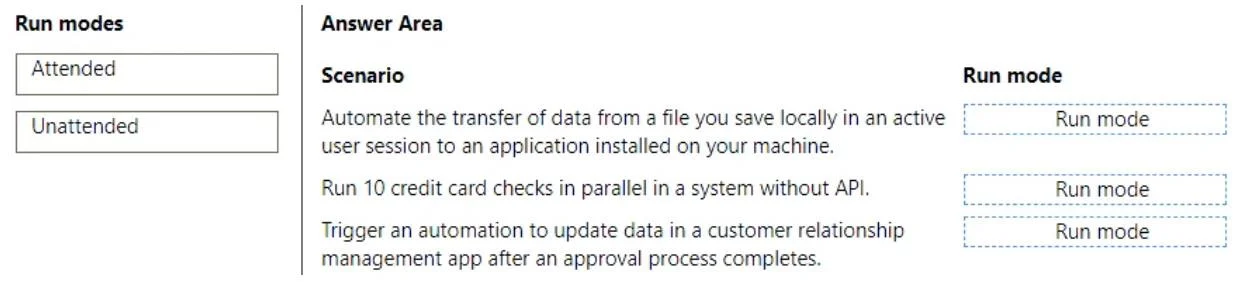
Answer Area
Drag items
Correct arrangement
- Attended
- Unattended
- Unattended
Explanation
The question assesses understanding of Attended versus Unattended run modes in automation, requiring the selection of the correct mode for three distinct scenarios based on their characteristics.
Approach. 1. Scenario 1: Automate the transfer of data from a file you save locally in an active user session to an application installed on your machine.
- Correct interaction: Drag 'Attended' to this scenario.
- Reasoning: The key phrases 'active user session' and 'application installed on your machine' indicate that a human user is logged in and actively using the machine. Attended automation runs alongside a human user, often on their desktop, and interacts within that active user session. It is typically used for front-office tasks that require human supervision or interaction at some point.
-
Scenario 2: Run 10 credit card checks in parallel in a system without API.
- Correct interaction: Drag 'Unattended' to this scenario.
- Reasoning: Running '10 credit card checks in parallel' suggests a high-volume, repetitive background task that should not interfere with an active user's work. 'Without API' implies UI automation. Unattended automation is designed for such tasks, running on dedicated virtual machines or servers in isolated, background sessions without requiring an active user's presence. It can handle multiple instances concurrently, making parallel processing efficient and non-disruptive.
-
Scenario 3: Trigger an automation to update data in a customer relationship management app after an approval process completes.
- Correct interaction: Drag 'Unattended' to this scenario.
- Reasoning: The phrase 'Trigger an automation...after an approval process completes' indicates an event-driven, background process. This type of automation operates autonomously once triggered, without needing a human to watch or interact with it. Unattended automation is ideal for back-office, scheduled, or event-driven tasks that require no human supervision and can run reliably in the background.
Common mistakes.
- common_mistake. A common mistake is to confuse the characteristics of Attended and Unattended automation. For example, choosing 'Unattended' for Scenario 1 would be incorrect because 'active user session' is a direct indicator of Attended automation; unattended bots run in isolated, headless sessions. Choosing 'Attended' for Scenario 2 would be wrong because running 10 parallel tasks on a user's active machine would be highly disruptive and inefficient; unattended bots excel at high-volume, background processing. Selecting 'Attended' for Scenario 3 would be incorrect as event-driven, background data updates are typical for unattended bots and do not require human presence or interaction.
Concept tested. Understanding the core differences and appropriate use cases for Attended and Unattended automation run modes, particularly in the context of Robotic Process Automation (RPA) or similar automation platforms.
Topics
Community Discussion
No community discussion yet for this question.