
PL-500 · Question #101
Drag and Drop Question A company hires you to develop a solution that helps the company manage new hires. Users will enter information about the new employee into an app and the app will save the…
The solution requires establishing a data model in Dataverse first, then building a model-driven app on that data, and finally creating a cloud flow to automate notifications based on new record creation.
Question
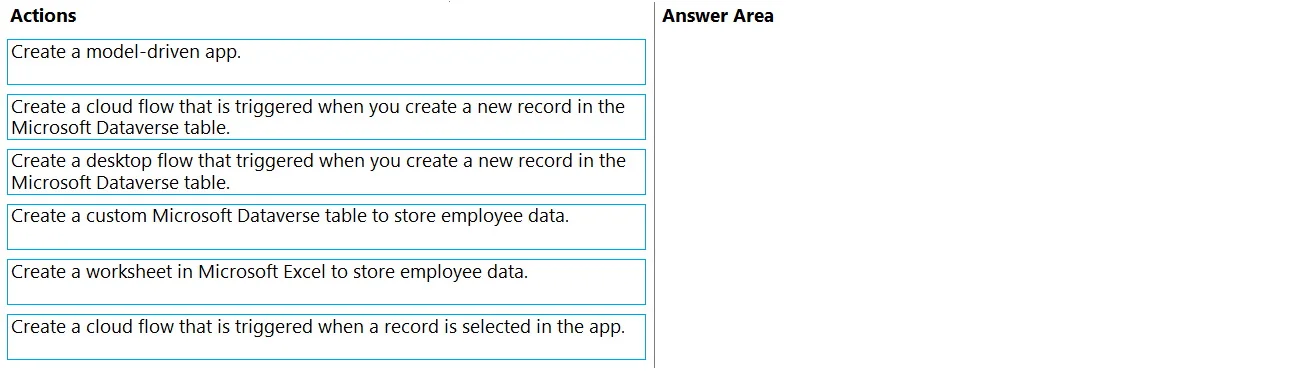
Drag and Drop Question A company hires you to develop a solution that helps the company manage new hires. Users will enter information about the new employee into an app and the app will save the information to a database. The app must be simple to use and must rely on a data model. You must implement a workflow that automatically notifies the IT department when new employee records are created in the database. You need to create the solution. Which three actions should you perform in sequence? To answer, move the appropriate actions from the list of actions to the answer area and arrange them in the correct order. Answer:
Exhibit
Options
- Action 1Create a model-driven app.
- Action 2Create a cloud flow that is triggered when you create a new record in the Microsoft Dataverse table.
- Action 3Create a custom connector that is triggered when you create a new record in the Microsoft Dataverse table.
- Action 4Create a custom Microsoft Dataverse table to store employee data.
- Action 5Create a worksheet in Microsoft Excel to store employee data.
- Action 6Create a cloud flow that is triggered when a record is selected in the app.
Why each option
The solution requires establishing a data model in Dataverse first, then building a model-driven app on that data, and finally creating a cloud flow to automate notifications based on new record creation.
Concept tested: Building a complete solution in Microsoft Power Platform, specifically understanding the roles and sequential dependencies of Dataverse (for data storage and modeling), Model-driven apps (for data-centric user interfaces), and Power Automate Cloud flows (for automated workflows triggered by data events).
Topics
Community Discussion
No community discussion yet for this question.