
PL-500 · Question #104
Drag and Drop Question You are developing automation solutions. You need to select solution components for each scenario. Which solution components should you use? To answer, drag the appropriate…
The correct answer is Cloud flow; Desktop flow; Process advisor. This question tests the understanding of Microsoft Power Automate components by matching specific automation requirements to their appropriate solution components.
Question
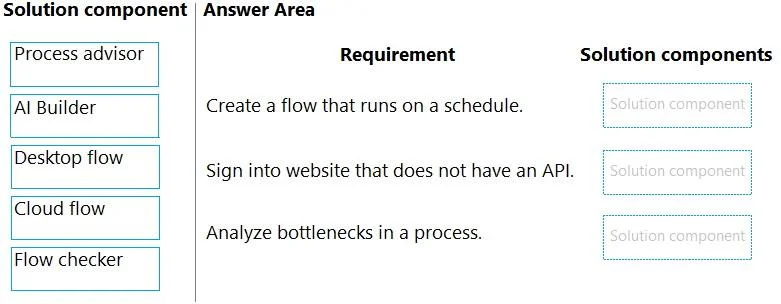
Drag and Drop Question You are developing automation solutions. You need to select solution components for each scenario. Which solution components should you use? To answer, drag the appropriate solution components to the correct requirements. Each solution component may be used once, more than once, or not at all. You may need to drag the split bar between panes or scroll view content. NOTE: Each correct selection is worth one point. Answer:
Exhibit
Answer Area
Drag items
Correct arrangement
- Cloud flow
- Desktop flow
- Process advisor
Explanation
This question tests the understanding of Microsoft Power Automate components by matching specific automation requirements to their appropriate solution components.
Approach. To answer correctly, each requirement must be matched with the Power Automate component designed for that specific task:
- 'Create a flow that runs on a schedule.' - The correct component is Cloud flow. Cloud flows are versatile automation tools that can be triggered by various events, including a predefined schedule (recurrence trigger).
- 'Sign into website that does not have an API.' - The correct component is Desktop flow. Desktop flows (RPA - Robotic Process Automation) are used to automate tasks on desktop applications and web browsers, mimicking human interaction, especially when there is no API available for direct integration.
- 'Analyze bottlenecks in a process.' - The correct component is Process advisor. Process advisor (formerly Process mining) is a Power Automate feature specifically designed to visualize, analyze, and identify bottlenecks and inefficiencies within business processes.
Common mistakes.
- common_mistake. Common mistakes include misinterpreting the core function of each component. For example:
- Dragging 'AI Builder' or 'Flow checker' to any requirement: 'AI Builder' provides AI models for tasks like form processing or object detection, not for scheduling flows, interacting with non-API websites, or analyzing bottlenecks. 'Flow checker' is for validating the design of a flow for errors and warnings, not for executing automation or process analysis.
- Using 'Desktop flow' for a scheduled cloud-based task: While a Cloud flow can trigger a Desktop flow, the core component that runs on a schedule as a primary trigger is the Cloud flow itself. Desktop flows are primarily for UI automation on a local machine.
- Using 'Cloud flow' for non-API website interaction: Cloud flows typically interact with services via APIs or connectors. They cannot directly emulate user interaction on a website's UI without an API, which is the domain of Desktop flows (RPA).
- Using 'AI Builder' for process bottleneck analysis: AI Builder focuses on adding AI capabilities (like prediction, form processing) to flows, not on analyzing the performance or bottlenecks of an overarching business process.
Concept tested. Understanding of Power Automate components (Cloud flows, Desktop flows, Process advisor) and their specific use cases, including Robotic Process Automation (RPA) and business process analysis.
Topics
Community Discussion
No community discussion yet for this question.