
PL-500 · Question #69
Drag and Drop Question A company has a customer relationship management (CRM) application that runs on a virtual machine (VM) in Azure. The solution must automatically extract common invoice data…
The correct answer is Create an instance of the invoice processing AI Builder model.; Create a desktop flow.; Define input variables in the desktop flow.; Define the logic in the desktop flow to write data to the CRM.; Create a cloud flow that extracts information from the model and triggers the desktop flow. The solution requires correctly sequencing the setup of an AI Builder model, a desktop flow for CRM interaction, and a cloud flow for orchestration to automatically extract invoice data and save it to a CRM.
Question
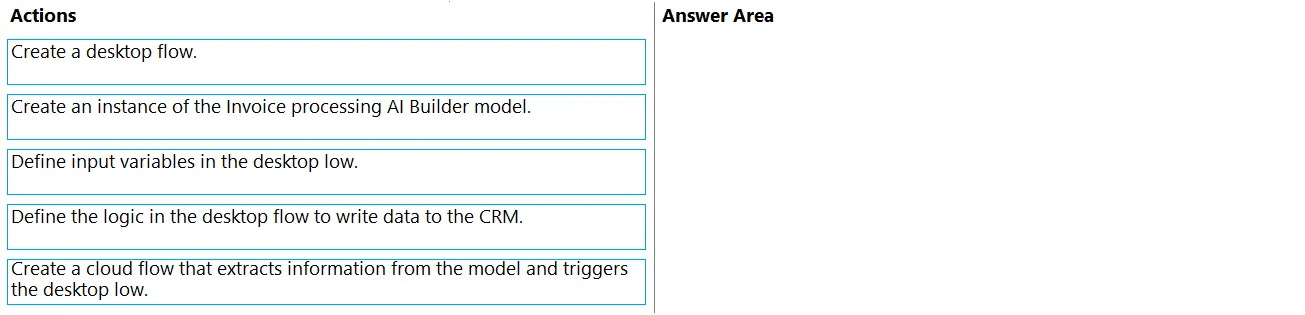
Drag and Drop Question A company has a customer relationship management (CRM) application that runs on a virtual machine (VM) in Azure. The solution must automatically extract common invoice data from documents sent as email attachments and save the data to the company's CRM application. You need to design the solution. In which order should you perform the actions? To answer, move all actions from the list of actions to the answer area and arrange them in the correct order. Answer:
Exhibit
Answer Area
Drag items
Correct arrangement
- Create an instance of the invoice processing AI Builder model.
- Create a desktop flow.
- Define input variables in the desktop flow.
- Define the logic in the desktop flow to write data to the CRM.
- Create a cloud flow that extracts information from the model and triggers the desktop flow.
Explanation
The solution requires correctly sequencing the setup of an AI Builder model, a desktop flow for CRM interaction, and a cloud flow for orchestration to automatically extract invoice data and save it to a CRM.
Approach. The correct approach for designing this solution involves a logical progression from defining the data extraction capabilities to setting up the interaction with the target application, and finally, orchestrating the entire process. Here's the correct order and reasoning:
- Create an instance of the Invoice processing AI Builder model. - This is the foundational step for data extraction. Before any data can be processed from invoices, the specialized AI model capable of understanding and extracting information from invoices needs to be made available and configured.
- Create a desktop flow. - The CRM application runs on a VM, indicating it's likely a desktop application or a legacy system that requires UI automation. A desktop flow (Power Automate for desktop) is the tool used to interact with such applications.
- Define input variables in the desktop flow. - The desktop flow will receive the extracted invoice data from the cloud flow. To accept this dynamic data, input variables must be defined within the desktop flow to store the incoming information (e.g., invoice number, customer name, total amount).
- Define the logic in the desktop flow to write data to the CRM. - Once the input variables are defined to receive data, the next step is to implement the actual automation logic within the desktop flow. This involves steps like opening the CRM application, navigating to the relevant form, and entering the data from the defined input variables into the CRM fields.
- Create a cloud flow that extracts information from the model and triggers the desktop flow. - This is the final orchestration step. A cloud flow is needed to act as the primary trigger (e.g., when an email with an attachment arrives), process the email attachment using the AI Builder model to extract the invoice data, and then call the desktop flow, passing the extracted data via its input variables for entry into the CRM.
Common mistakes.
- common_mistake. Common mistakes include attempting to create the cloud flow first, as it depends on both the AI Builder model and the desktop flow being defined. Creating the desktop flow before defining the AI Builder model is also suboptimal because the structure of the extracted data influences the desktop flow's input variables. Defining desktop flow logic before variables would lead to an incomplete or non-functional flow, as there would be no mechanism to receive dynamic data. Each component has prerequisites that must be met before it can be effectively integrated and used.
Concept tested. This question tests the understanding of how to design and implement an end-to-end automation solution using Microsoft Power Automate, specifically integrating AI Builder for document processing, Power Automate for desktop (desktop flows) for UI automation with legacy or on-premises applications, and Power Automate (cloud flows) for overall orchestration and triggering logic.
Topics
Community Discussion
No community discussion yet for this question.