
PL-500 · Question #105
Drag and Drop Question You are developing automation solutions for a company. You need to select the applicable flow type to automate the following tools and technologies: - Microsoft Excel…
The correct answer is Cloud flows or desktop flows; Desktop flows only; Cloud flows or desktop flows. This question tests the understanding of Power Automate's different flow types (Cloud flows, Desktop flows) and their applicability to various automation targets, including Microsoft Excel, general desktop applications, and the file system.
Question
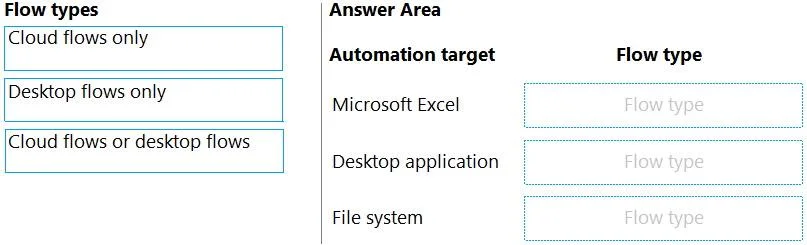
Drag and Drop Question You are developing automation solutions for a company. You need to select the applicable flow type to automate the following tools and technologies:
- Microsoft Excel
- Desktop application
- File system
Which flow types should you use? To answer, drag the appropriate flow types to the correct automation targets. Each flow type may be used once, more than once or not at all You may need to drag the split bar between panes or scroll to view content. NOTE: Each correct selection is worth one point. Answer:
Exhibit
Answer Area
Drag items
Correct arrangement
- Cloud flows or desktop flows
- Desktop flows only
- Cloud flows or desktop flows
Explanation
This question tests the understanding of Power Automate's different flow types (Cloud flows, Desktop flows) and their applicability to various automation targets, including Microsoft Excel, general desktop applications, and the file system.
Approach. The correct interaction involves dragging the flow types to the answer area as follows:
- Microsoft Excel -> Cloud flows or desktop flows: Microsoft Excel can be automated using both cloud flows (e.g., via Excel Online connectors in OneDrive/SharePoint, or specific Excel business connectors) and desktop flows (to automate the desktop application of Excel on a local machine via UI automation or direct Excel actions).
- Desktop application -> Desktop flows only: A generic 'Desktop application' by definition resides on a local machine and typically requires UI automation, scripting, or robotic process automation (RPA) capabilities, which are exclusively provided by Power Automate for desktop (desktop flows).
- File system -> Cloud flows or desktop flows: File system operations can be performed using cloud flows (e.g., using connectors for OneDrive, SharePoint, FTP, or on-premises data gateway for network shares) or desktop flows (to interact directly with the local file system of the machine where the desktop flow runs).
Common mistakes.
- common_mistake. A common mistake is to exclusively assign 'Desktop flows only' to Excel or the File system. While desktop flows are highly capable for these, cloud flows also offer significant automation capabilities through various connectors (e.g., Excel Online connector for Excel, OneDrive/SharePoint/FTP connectors for file systems, or on-premises data gateway for local file access). Conversely, assigning 'Cloud flows only' to a generic 'Desktop application' is incorrect because cloud flows, by themselves, cannot directly interact with the UI or processes of a desktop application running on a local machine without leveraging a desktop flow component. Understanding the hybrid capabilities of Power Automate, where cloud flows can orchestrate desktop flows, is key to answering correctly.
Concept tested. The core concept being tested is the understanding of Power Automate's different automation capabilities: Cloud flows (API-based, connector-driven automation, often cloud-to-cloud or cloud-to-on-premises via gateway) versus Desktop flows (RPA/UI automation for applications running on a local desktop machine). It assesses when each flow type is applicable, or when both can be used, for common automation targets like office applications and file systems.
Reference. null
Topics
Community Discussion
No community discussion yet for this question.