
PL-500 · Question #106
Drag and Drop Question A company has an unattended cloud flow solution. The solution includes a desktop flow that runs on a virtual machine. The company reports that the cloud flow processes more…
This question tests knowledge of how to horizontally scale an unattended Power Automate Desktop flow solution using machine groups when a single virtual machine can no longer handle the transaction volume. The correct four-step sequence progresses from infrastructure…
Question
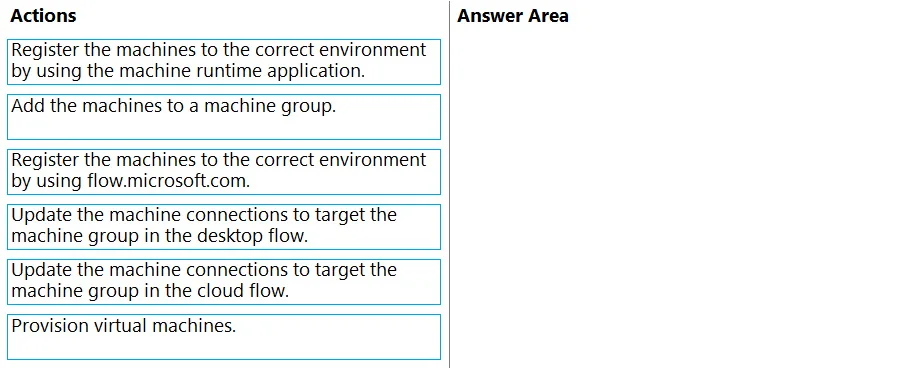
Drag and Drop Question A company has an unattended cloud flow solution. The solution includes a desktop flow that runs on a virtual machine. The company reports that the cloud flow processes more transactions per day than the planned capacity. You need to scale the solution to keep up with demand. Which four actions should you perform in sequence? To answer, move the appropriate actions from the list of actions to the answer area and arrange them in the correct order. Answer:
Exhibit
Explanation
This question tests knowledge of how to horizontally scale an unattended Power Automate Desktop flow solution using machine groups when a single virtual machine can no longer handle the transaction volume. The correct four-step sequence progresses from infrastructure provisioning to flow configuration.
Approach. The correct sequence is: (1) Provision virtual machines - you must first create additional VMs to add capacity; (2) Register the machines to the correct environment using the machine runtime application - each new VM must be registered in Power Automate so the platform can discover and manage them; (3) Add the machines to a machine group - a machine group is Power Automate's load-balancing construct that queues and distributes desktop flow runs across all member machines; (4) Update the machine connections to target the machine group in the cloud flow - the cloud flow's desktop flow action must point to the machine group (not a single machine) so runs are automatically dispatched to whichever group member is available. This pattern converts a single-machine bottleneck into a horizontally scaled pool without changing the flow logic itself.
Concept tested. Scaling unattended Power Automate Desktop flows using machine groups - specifically the end-to-end process of provisioning infrastructure, registering machines via the machine runtime application, grouping them for load distribution, and updating cloud flow connections to target the group rather than an individual machine.
Reference. Microsoft Learn - 'Manage machines and machine groups' in Power Automate documentation (learn.microsoft.com/en-us/power-automate/desktop-flows/manage-machines)
Topics
Community Discussion
No community discussion yet for this question.