
PL-500 · Question #89
Drag and Drop Question You have a machine that runs an automation solution. You need to move the machine to a different environment. Which three actions should you perform in sequence? To answer…
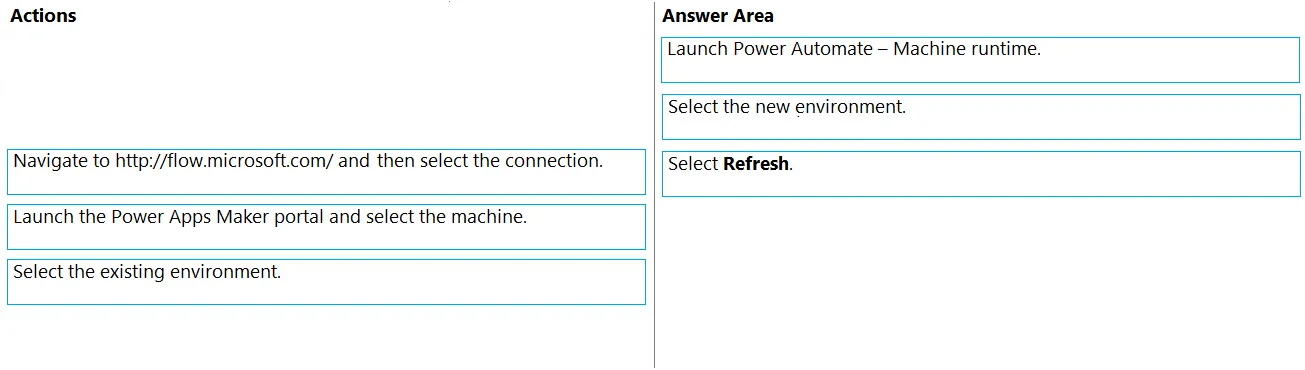
The correct answer is Launch Power Automate - Machine runtime.; Select the new environment.; Select Refresh. To move a Power Automate machine to a different environment, you must launch the machine's local runtime application, select the new environment, and then refresh to apply the changes.
Question
Drag and Drop Question You have a machine that runs an automation solution. You need to move the machine to a different environment. Which three actions should you perform in sequence? To answer, move the appropriate actions from the list of actions to the answer area and arrange them in the correct order. Answer:
Exhibit
Answer Area
Drag items
Correct arrangement
- Launch Power Automate - Machine runtime.
- Select the new environment.
- Select Refresh.
Explanation
To move a Power Automate machine to a different environment, you must launch the machine's local runtime application, select the new environment, and then refresh to apply the changes.
Approach. The correct interaction is to drag the specified actions into the Answer Area in the following sequence:
- Launch Power Automate - Machine runtime. To change the environment a Power Automate machine is associated with, you must interact with the Power Automate Machine runtime application directly on the machine itself. This local client manages the machine's connection and registration.
- Select the new environment. Once the Machine runtime application is open, it allows you to configure which Power Automate environment the machine should connect to. To move the machine, you must explicitly select the desired new environment from the available options within this application.
- Select Refresh. After choosing the new environment, a 'Refresh' or 'Apply' action is typically required within the Machine runtime application to confirm the change. This action registers the machine with the newly selected environment, effectively moving its association from the previous one.
Common mistakes.
- common_mistake. Other options are incorrect because:
- 'Navigate to http://flow.microsoft.com/ and then select the connection.' This action is for managing cloud flows, connections, or other resources within a web portal, not for directly changing the environment registration of a desktop flow machine.
- 'Launch the Power Apps Maker portal and select the machine.' While the Power Apps Maker portal (make.powerapps.com) allows you to view and manage solutions and potentially machines, the direct process of changing a machine's environment registration is performed through the local Power Automate Machine runtime application, not via the web portal.
- 'Select the existing environment.' The goal is to move the machine to a different environment, so selecting the existing one would not achieve the desired outcome.
- Incorrect ordering of the correct steps would also be wrong; for instance, you cannot select a new environment before launching the application that allows you to do so, nor can you refresh changes that haven't been selected yet.
Concept tested. Power Automate machine registration, environment management for desktop flows, and the functionality of the Power Automate Machine runtime application.
Topics
Community Discussion
No community discussion yet for this question.