
PL-500 · Question #108
Drag and Drop Question You manage automation solutions for a company. You need to select the appropriate patch type for each scenario. Which patch types should you use? To answer, drag the…
The correct answer is Upgrade; Update; Stage for upgrade. The question tests the understanding of different patch types - Upgrade, Update, and Stage for upgrade - based on how they handle existing components and the nature of the version change.
Question
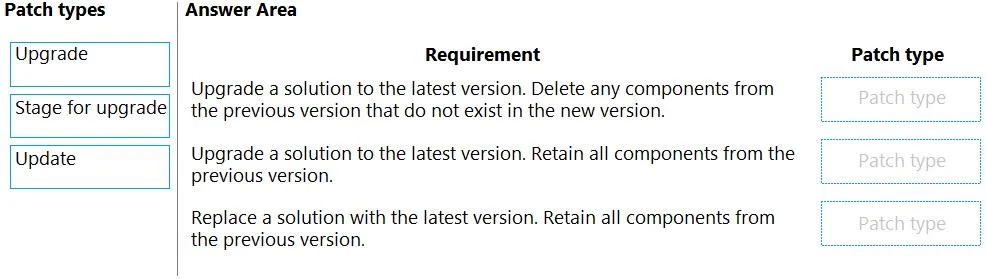
Drag and Drop Question You manage automation solutions for a company. You need to select the appropriate patch type for each scenario. Which patch types should you use? To answer, drag the appropriate patch types to the correct requirements. Each patch type may be used once, more than once, or not at all. You may need to drag the bar between panes or scroll to view content. NOTE: Each correct selection is worth one point. Answer:
Exhibit
Answer Area
Drag items
Correct arrangement
- Upgrade
- Update
- Stage for upgrade
Explanation
The question tests the understanding of different patch types - Upgrade, Update, and Stage for upgrade - based on how they handle existing components and the nature of the version change.
Approach. The correct approach is to carefully read each 'Requirement' and match it with the 'Patch type' that best describes the described behavior regarding component retention and solution versioning.
-
Requirement: 'Upgrade a solution to the latest version. Delete any components from the previous version that do not exist in the new version.'
- Reasoning: This description aligns with an 'Upgrade'. A major upgrade often involves significant architectural changes, deprecation of old features, and the removal of components that are no longer part of the new version. It's a fundamental shift, not just an incremental addition.
- Correct Selection: Upgrade
-
Requirement: 'Upgrade a solution to the latest version. Retain all components from the previous version.'
- Reasoning: Although it uses the term 'upgrade', the key differentiator is 'Retain all components'. This indicates a less disruptive change, typically an 'Update'. Updates usually involve bug fixes, security patches, or minor feature additions, where existing functionality and components are preserved and augmented, rather than removed.
- Correct Selection: Update
-
Requirement: 'Replace a solution with the latest version. Retain all components from the previous version.'
- Reasoning: The phrase 'Replace a solution' suggests a complete swap rather than an in-place modification. However, 'Retain all components from the previous version' implies that the new solution must fully replicate or incorporate all existing functionality and data. This scenario best fits 'Stage for upgrade', which often refers to preparing a new environment or deploying a new version in parallel to fully replace an old one, ensuring complete continuity and preservation of existing components or their functional equivalents.
- Correct Selection: Stage for upgrade
Common mistakes.
- common_mistake. A common mistake is confusing 'Upgrade' and 'Update'. 'Upgrade' typically implies more significant, potentially breaking changes that may involve removing old components, while 'Update' refers to incremental changes, bug fixes, or minor feature additions that generally preserve all existing components. Misinterpreting 'Stage for upgrade' as just another term for 'upgrade' is also common; it specifically implies a transitional process for a full replacement while ensuring continuity.
Concept tested. Software versioning, patching strategies, and lifecycle management, specifically differentiating between major upgrades, minor updates, and full solution replacement strategies in automation or software deployment.
Topics
Community Discussion
No community discussion yet for this question.