
PL-500 · Question #113
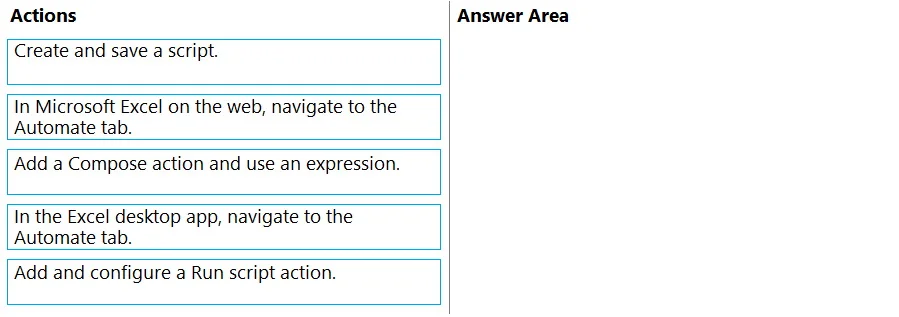
Drag and Drop Question You are developing automation solutions for a company. You need to use Microsoft Office scripts in a cloud flow to calculate the number of business days between two dates…
To use Microsoft Office scripts in a cloud flow, you first navigate to the Automate tab in Excel on the web, then create and save the script, and finally add a 'Run script' action in your cloud flow.
Question
Drag and Drop Question You are developing automation solutions for a company. You need to use Microsoft Office scripts in a cloud flow to calculate the number of business days between two dates. Which three actions should you perform in sequence? To answer, move the appropriate actions from the list of actions to the answer area and arrange them in the correct order. Answer:
Exhibit
Options
- Box1In Microsoft Excel on the web, navigate to the Automate tab.
- Box2Create and save a script.
- Box3In Power Automate, add a Run script action from the Excel Online (Business) connector.
Why each option
To use Microsoft Office scripts in a cloud flow, you first navigate to the Automate tab in Excel on the web, then create and save the script, and finally add a 'Run script' action in your cloud flow.
Concept tested: The underlying technical concept being tested is the process of integrating Microsoft Office Scripts (specifically Excel Scripts) with Microsoft Power Automate (cloud flows). This includes understanding the development environment for Office Scripts (Excel on the web's Automate tab), the necessity of creating and saving the script, and the specific Power Automate action ('Run script') used to invoke an Office Script.
Topics
Community Discussion
No community discussion yet for this question.