
PL-500 · Question #115
Drag and Drop Question You are developing automation solutions for a company. You need to use an environment variable in a cloud flow. Which three actions should you perform in sequence? To answer…
The correct answer is Navigate to https://admin.powerplatform.com.; Add an environment variable to a solution.; Determine the flow action that will use the environment variable.; Assign the environment variable to the action. To use an environment variable in a cloud flow, you must first create the variable in a solution, then identify where in the flow to use it, and finally assign it to that specific flow action.
Question
Drag and Drop Question You are developing automation solutions for a company. You need to use an environment variable in a cloud flow. Which three actions should you perform in sequence? To answer, move the appropriate actions from the list of actions to the answer area and arrange them in the correct order. Answer:
Exhibit
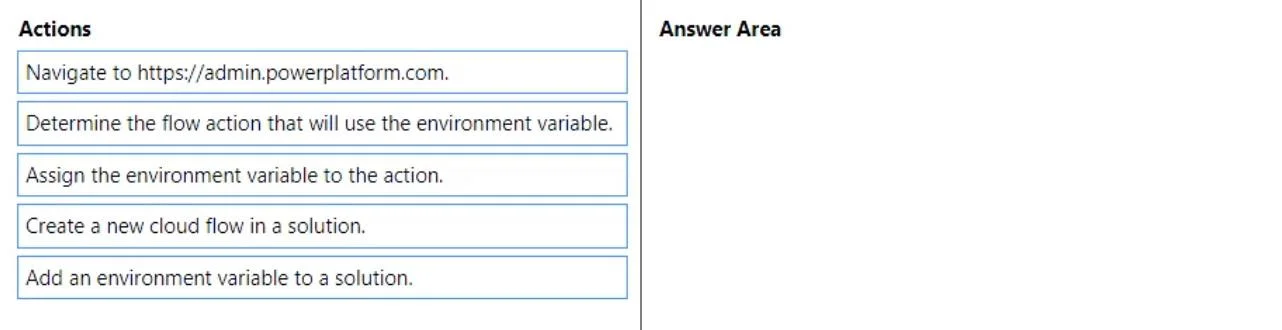
Answer Area
Drag items
Correct arrangement
- Navigate to https://admin.powerplatform.com.
- Add an environment variable to a solution.
- Determine the flow action that will use the environment variable.
- Assign the environment variable to the action.
Explanation
To use an environment variable in a cloud flow, you must first create the variable in a solution, then identify where in the flow to use it, and finally assign it to that specific flow action.
Approach. The correct interaction is to drag the following three actions from the 'Actions' pane to the 'Answer Area' in the specified order:
- Add an environment variable to a solution. - This is the foundational first step. Before an environment variable can be used, it must be created and added as a component to a Power Platform solution. This ensures it's solution-aware and can be properly deployed across environments.
- Determine the flow action that will use the environment variable. - Once the environment variable exists, the next logical step is to identify the specific step or action within your cloud flow (which could be a newly created or an existing flow within the same solution) where this variable's value needs to be consumed or referenced.
- Assign the environment variable to the action. - After pinpointing the exact flow action, the final step involves configuring that action to retrieve and utilize the value of the environment variable. This is typically done by selecting the environment variable as a dynamic content option for the relevant parameter of the flow action.
Common mistakes.
- common_mistake. Common mistakes include selecting irrelevant actions or incorrect sequencing.
- 'Navigate to https://admin.powerplatform.com.' is incorrect because the Power Platform Admin Center is primarily for administrative tasks, not for authoring solution components like environment variables or cloud flows. Development work typically occurs in make.powerapps.com or make.powerautomate.com.
- 'Create a new cloud flow in a solution.' is a necessary prerequisite to having a flow where the variable can be used, but the question specifically asks for the actions to 'use an environment variable in a cloud flow.' The provided correct answer focuses on the specific steps directly related to the variable's creation and integration, rather than the broader flow creation process. While critical, it's considered a surrounding task or implicitly assumed when you 'determine the flow action.' If included, it would generally follow 'Add an environment variable to a solution' but precede 'Determine the flow action that will use the environment variable.'
- Incorrect order of 'Determine the flow action...' and 'Assign the environment variable...' would be illogical; you must first identify where the variable is to be used before you can assign or configure its usage for that specific spot.
Concept tested. The core concept tested is the proper implementation and lifecycle of environment variables within Microsoft Power Platform, specifically how they are created as solution components and then integrated into Power Automate cloud flows to manage configurable values across different deployment environments.
Topics
Community Discussion
No community discussion yet for this question.