
PL-500 · Question #162
Drag and Drop Question You need to create several desktop flow processes on the same application. Each process uses different sign-in data. You need to create and use a standalone sign-in process…
The correct answer is Define input variables.; Create sign-in process.; Add Run desktop flow action in each process.; Set input variables. This question assesses the ability to design and implement reusable sign-in logic across multiple Power Automate Desktop flows by utilizing separate flows and input variables.
Question
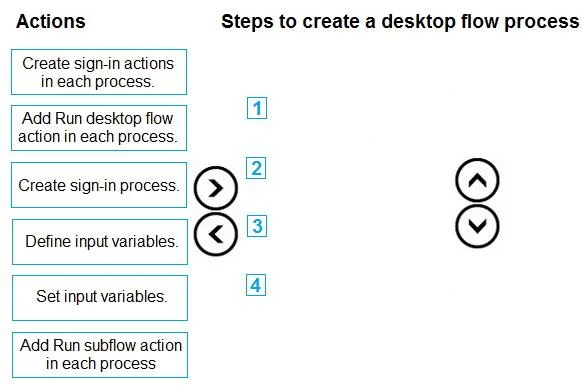
Drag and Drop Question You need to create several desktop flow processes on the same application. Each process uses different sign-in data. You need to create and use a standalone sign-in process. Which four actions should you perform in sequence? To answer, move the appropriate actions from the list of actions to the answer area and arrange them in the correct order. Answer:
Exhibit
Answer Area
Drag items
Correct arrangement
- Define input variables.
- Create sign-in process.
- Add Run desktop flow action in each process.
- Set input variables.
Explanation
This question assesses the ability to design and implement reusable sign-in logic across multiple Power Automate Desktop flows by utilizing separate flows and input variables.
Approach. The problem asks to create a 'standalone sign-in process' that can be used by 'several desktop flow processes', each requiring 'different sign-in data'. This scenario demands a modular approach using a separate desktop flow that accepts parameters.
Here's the correct sequence and reasoning:
-
Define input variables. - The first conceptual step is to identify and define the input variables (e.g.,
Username,Password) that the standalone sign-in process will need to receive from the calling flows. This sets the interface for the reusable component. -
Create sign-in process. - This action involves physically creating the new desktop flow that will serve as the standalone sign-in module. This flow will contain the actual automation steps (e.g., launch browser, populate fields, click login button) and will utilize the input variables defined in the previous step.
-
Add Run desktop flow action in each process. - For each of the 'several desktop flow processes' that need to use the centralized sign-in logic, you must add the 'Run desktop flow' action. This action is specifically designed to invoke a separate desktop flow, making it suitable for calling the standalone sign-in process.
-
Set input variables. - When configuring the 'Run desktop flow' action within each calling process (from step 3), you must provide the concrete values for the input variables (like specific usernames and passwords) that the standalone sign-in flow expects. This allows each calling process to pass its unique sign-in data to the reusable flow.
Common mistakes.
-
common_mistake. Common mistakes and why other choices are incorrect:
-
'Create sign-in actions in each process.': This choice is incorrect because it contradicts the requirement for a 'standalone sign-in process' and reusability. It would lead to duplicating the sign-in logic across all desktop flows, making maintenance inefficient.
-
'Add Run subflow action in each process': This action is used to call a subflow within the same desktop flow. The question refers to 'several desktop flow processes', implying distinct desktop flows that need to share the sign-in logic. For invoking a separate desktop flow, the 'Run desktop flow' action is necessary, not 'Run subflow'.
-
Incorrect ordering of steps: An illogical sequence, such as attempting to 'Set input variables' before they are 'Defined' or before the 'Create sign-in process' itself exists, would be incorrect. The provided sequence correctly follows the logical progression of designing the interface, building the component, then integrating and configuring its usage.
Concept tested. The core concept tested is modularity and reusability in Power Automate Desktop. This includes understanding how to create standalone automation components (separate desktop flows), how to pass data to these components using input variables, and how to invoke these reusable flows from other desktop flows using the 'Run desktop flow' action. It specifically differentiates between reusable logic within a single flow (subflows) versus across multiple flows (separate desktop flows).
Topics
Community Discussion
No community discussion yet for this question.