
PL-500 · Question #107
Drag and Drop Question A company stores confidential documents in a SharePoint document library. A developer must create an automation solution in a default environment that processes documents from…
The correct answer is Box1. Create a new data policy in the Microsoft Power Platform admin center. Box2. Set the policy scope to Exclude certain environments and add the Production category. Box3. Add the SharePoint and Approvals connectors to the Business category. Box4. Add the Azure File Storage connector to the Business category. Box5. Confirm and save the policy. To configure a Data Loss Prevention (DLP) policy for a Power Platform automation solution that archives confidential documents from SharePoint to Azure File Storage, the steps involve creating the policy, categorizing the necessary connectors together, configuring specific…
Question
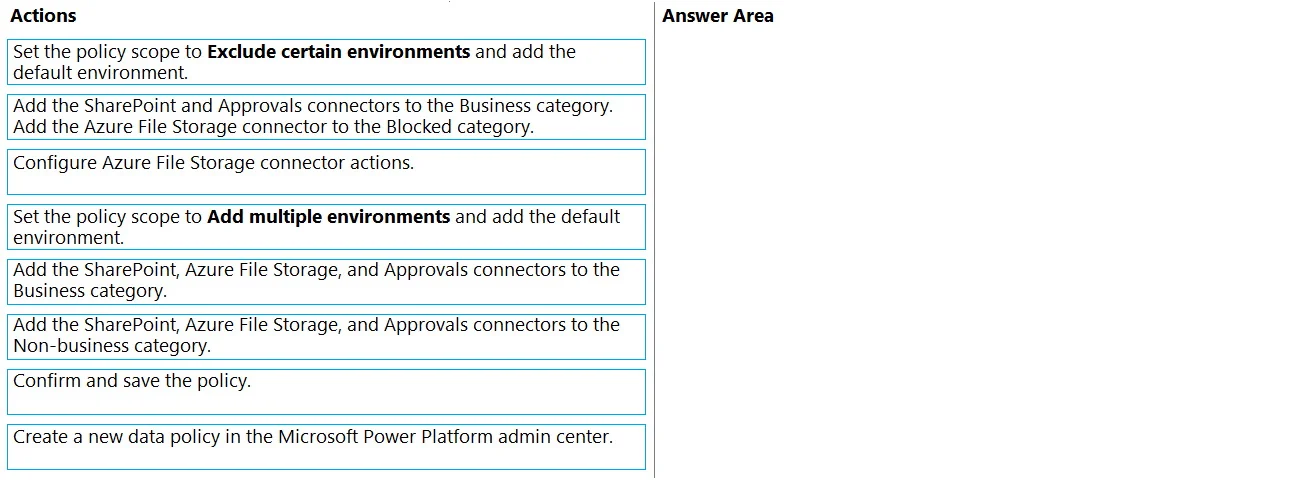
Drag and Drop Question A company stores confidential documents in a SharePoint document library. A developer must create an automation solution in a default environment that processes documents from the SharePoint library and uploads approved documents to Azure File Storage for archiving purposes. The automation must meet the following requirements:
- Prevent modification or deletion of approved documents from Azure
File Storage.
- Prevent sharing of documents from SharePoint or Azure File Storage.
You need to configure a data loss prevention (DLP) policy. Which five actions should you perform in sequence? To answer, move the appropriate actions from the list of actions to the answer area and arrange them in the correct order. Answer:
Exhibit
Options
- Box1Create a new data policy in the Microsoft Power Platform admin center.
- Box2Set the policy scope to Exclude certain environments and add the Production category.
- Box3Add the SharePoint and Approvals connectors to the Business category.
- Box4Add the Azure File Storage connector to the Business category.
- Box5Confirm and save the policy.
Why each option
To configure a Data Loss Prevention (DLP) policy for a Power Platform automation solution that archives confidential documents from SharePoint to Azure File Storage, the steps involve creating the policy, categorizing the necessary connectors together, configuring specific connector actions to prevent modification or deletion, scoping the policy to the target environment, and finally saving it.
Concept tested: Microsoft Power Platform Data Loss Prevention (DLP) policies, including creating policies, defining environment scope, categorizing connectors into Business/Non-business/Blocked groups, and configuring specific connector actions.
Source: null
Topics
Community Discussion
No community discussion yet for this question.