
PL-500 · Question #23
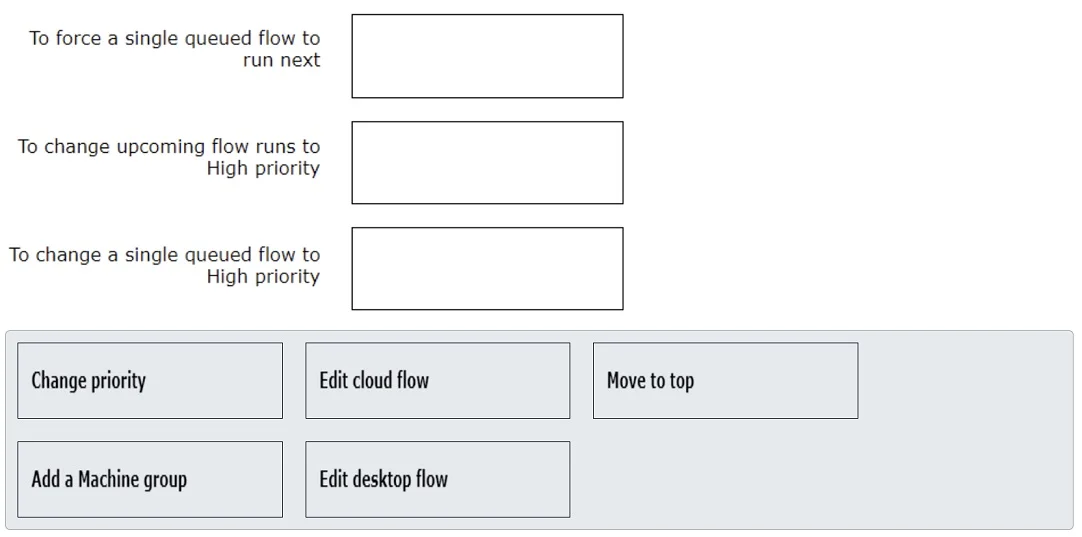
Drag and Drop Question You are a Power Automate developer working with desktop flows. You run many different flows as unattended flows on a set of Azure virtual machines. You need to control the…
The correct answer is Move to top; Edit cloud flow; Change priority. This question assesses the test-taker's ability to manage the run order and priority of Power Automate desktop flows, distinguishing between actions for individual queued runs and configurations for future runs.
Question
Exhibit
Answer Area
Drag items
Correct arrangement
- Move to top
- Edit cloud flow
- Change priority
Explanation
This question assesses the test-taker's ability to manage the run order and priority of Power Automate desktop flows, distinguishing between actions for individual queued runs and configurations for future runs.
Approach. Based on the provided solution in the second image and Power Automate desktop flow management principles:
- 'To force a single queued flow to run next' should be answered with 'Move to top'. When managing a queue of desktop flow runs, 'Move to top' is the specific action used to reorder a single, currently queued run so that it executes immediately after the current run (or next if the machine is free). This effectively forces it to run next, overriding its current position in the queue.
- 'To change upcoming flow runs to High priority' should be answered with 'Edit cloud flow'. Desktop flows are often triggered by cloud flows. To set a priority for future/upcoming runs, the priority setting needs to be configured at the source of the trigger, which is typically within the cloud flow action that invokes the desktop flow. By editing the cloud flow, one can modify the priority setting (e.g., 'Normal', 'High') for all subsequent desktop flow executions initiated by that cloud flow.
- 'To change a single queued flow to High priority' should be answered with 'Change priority'. This action is used to modify the priority (e.g., from Normal to High or vice versa) of an individual desktop flow run that is currently in the queue but has not yet started. It changes its priority relative to other queued flows, influencing when it might run, but does not necessarily force it to run next like 'Move to top' would.
Common mistakes.
- common_mistake. Common mistakes include confusing the scope of actions-individual runs versus future runs, or the purpose of each management option:
- 'Add a Machine group' is incorrect for any of these scenarios because it is used for organizing and scaling the execution environment for desktop flows by grouping multiple machines, not for controlling the run order or priority of individual or upcoming flow runs.
- 'Edit desktop flow' is incorrect because it is used to modify the actual logic or steps within the desktop flow itself (e.g., changing an automation step, adding a variable). It has no direct impact on the priority or queue position of an already defined flow run.
- Confusing 'Change priority' with 'Move to top': 'Change priority' adjusts a flow's precedence in the queue but doesn't guarantee it runs immediately next. 'Move to top' specifically forces it to be the next in line. Using 'Change priority' for 'To force a single queued flow to run next' would be insufficient, as a flow with High priority might still be behind another High priority flow, or a 'Moved to top' flow.
- Attempting to use 'Change priority' for 'upcoming flow runs': 'Change priority' applies to existing queued runs, not to configure default priority for future runs, which is typically set at the trigger (cloud flow) level.
Concept tested. The core concept tested is the management and orchestration of Power Automate desktop flow runs, specifically understanding the difference between setting priority for individual queued runs versus configuring default priority for upcoming runs, and the distinct actions available for reordering and prioritizing flows within the run queue in Power Automate portal.
Topics
Community Discussion
No community discussion yet for this question.