
PL-500 · Question #87
Drag and Drop Question You create a solution within a Microsoft Power Platform environment. The environment includes all connections required for the solution. You need to create a connection…
The correct answer is Action1. Within the solution, select New and then connection references. Action2. Select a connector to the connection references. Action3. Use the connection reference in the relevant cloud flows within the solution. Action4. Assign an exiting connection to the connection reference. To create and utilize a connection reference for flows within a Power Platform solution, you must first initiate its creation, define the connector, link it to an existing connection, and then incorporate it into your cloud flows.
Question
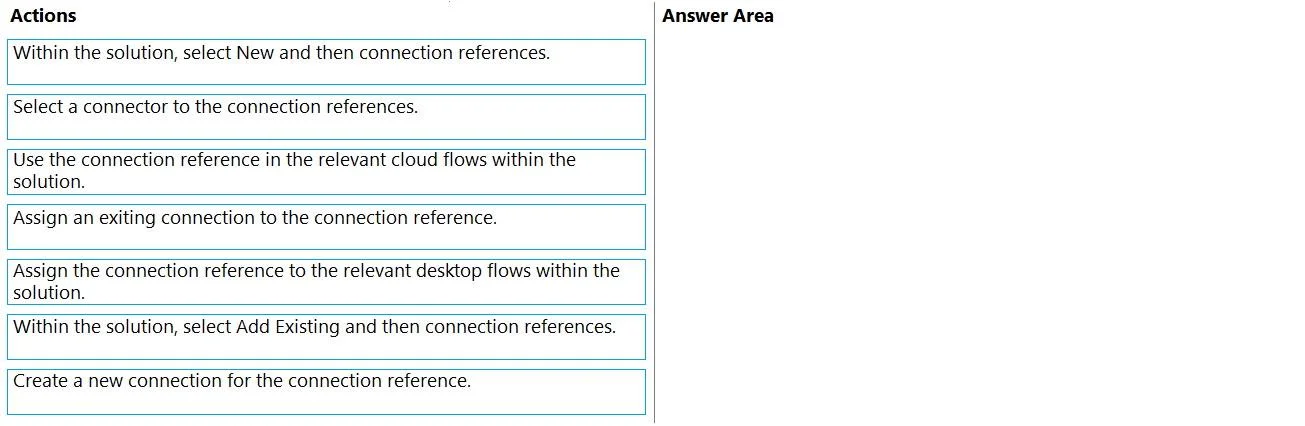
Drag and Drop Question You create a solution within a Microsoft Power Platform environment. The environment includes all connections required for the solution. You need to create a connection reference for the flows. Which four actions should you perform in sequence? To answer, move the appropriate actions from the list of actions to the answer area and arrange them in the correct order. Answer:
Exhibit
Options
- Action1Within the solution, select New and then connection references.
- Action2Select a connector to the connection references.
- Action3Use the connection reference in the relevant cloud flows within the solution.
- Action4Assign an exiting connection to the connection reference.
- Action5Assign the connection reference to the relevant desktop flows within the solution.
- Action6Within the solution, select Add Existing and then connection references.
- Action7Create a new connection for the connection reference.
Why each option
To create and utilize a connection reference for flows within a Power Platform solution, you must first initiate its creation, define the connector, link it to an existing connection, and then incorporate it into your cloud flows.
Concept tested: The underlying technical concept being tested is the understanding of Connection References within Microsoft Power Platform solutions, their purpose in abstracting connections for portability and maintainability, and the correct procedure for creating and utilizing them, especially in the context of Power Automate (cloud flows). It assesses knowledge of Power Platform solution components and best practices for environment management.
Topics
Community Discussion
No community discussion yet for this question.