
PL-500 · Question #84
Drag and Drop Question You are preparing to create a cloud flow that queries data from a SharePoint list. You must use different SharePoint lists for the test and production environments. You need…
The correct answer is Create new cloud flow in a solution and add a Get items action.; Create an environment variable where Data Type equals Data source and Parameter Type equals Site.; Create an environment variable where Data Type equals Data source and Parameter Type equals List.; Manually enter the names for the SharePoint site and list.; Select the target SharePoint site and list from a list of displayed values. To enable a Power Automate cloud flow to use different SharePoint lists across environments, the flow must be configured within a solution to utilize environment variables for the SharePoint site and list, along with a connection reference.
Question
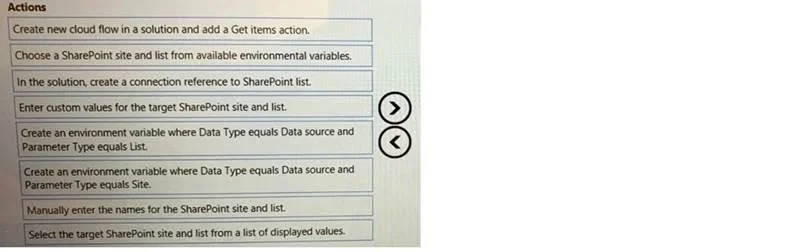
Drag and Drop Question You are preparing to create a cloud flow that queries data from a SharePoint list. You must use different SharePoint lists for the test and production environments. You need to configure the flow to select the correct SharePoint list for the environment where you deploy the flow. Which five actions should you perform in sequence? To answer, move the appropriate actions from the list of actions to the answer area and arrange them in the correct order. Answer:
Exhibit
Answer Area
Drag items
Correct arrangement
- Create new cloud flow in a solution and add a Get items action.
- Create an environment variable where Data Type equals Data source and Parameter Type equals Site.
- Create an environment variable where Data Type equals Data source and Parameter Type equals List.
- Manually enter the names for the SharePoint site and list.
- Select the target SharePoint site and list from a list of displayed values.
Explanation
To enable a Power Automate cloud flow to use different SharePoint lists across environments, the flow must be configured within a solution to utilize environment variables for the SharePoint site and list, along with a connection reference.
Approach. The correct approach involves setting up the cloud flow within a solution, defining environment variables for the SharePoint site and list, establishing a connection reference, and then configuring the flow's 'Get items' action to consume these environment variables. The sequence is critical for a logical setup:
- Create new cloud flow in a solution and add a Get items action. - This is the foundational step. A flow within a solution is essential for Application Lifecycle Management (ALM), and the 'Get items' action is specifically required to query data from a SharePoint list.
- Create an environment variable where Data Type equals Data source and Parameter Type equals Site. - To dynamically select the SharePoint site based on the environment, an environment variable of 'Data source' data type and 'Site' parameter type must be created. This variable will hold the SharePoint site URL for a given environment.
- Create an environment variable where Data Type equals Data source and Parameter Type equals List. - Similarly, an environment variable of 'Data source' data type and 'List' parameter type is needed to dynamically specify the SharePoint list. This allows the flow to point to different lists in different environments.
- In the solution, create a connection reference to SharePoint list. - A connection reference is a crucial solution component for Power Automate flows that interact with external services like SharePoint. It manages authentication and connection details, enabling proper ALM for connections across environments.
- Choose a SharePoint site and list from available environmental variables. - This is the final configuration step for the 'Get items' action within the cloud flow. The action is configured to reference the environment variables created in steps 2 and 3 for its 'Site Address' and 'List Name' parameters, thus enabling the dynamic selection required by the scenario.
Common mistakes.
- common_mistake. Common mistakes include misunderstanding the purpose of environment variables and connection references, or incorrectly sequencing the setup steps. Other choices are wrong because:
- Manually enter the names for the SharePoint site and list: This contradicts the requirement for environment-specific dynamic selection, as it hardcodes values and prevents the flow from adapting to different environments without manual modification.
- Select the target SharePoint site and list from a list of displayed values: Similar to manual entry, this implies static selection during development, which bypasses the dynamic capabilities of environment variables needed for ALM across environments.
- Enter custom values for the target SharePoint site and list: While environment variables do have values that are 'entered' (either as default values during creation or overridden during deployment), this action describes the act of populating the data into the variable, not the structural configuration of the flow or the environment variables themselves to enable dynamic selection. The correct sequence focuses on setting up the mechanism.
Concept tested. Power Automate solutions for Application Lifecycle Management (ALM), environment variables for dynamic configuration, and connection references for managing external service connections.
Topics
Community Discussion
No community discussion yet for this question.