
PL-500 · Question #96
Drag and Drop Question You develop automation solutions for a company. The company does not permit changes to a deployed solution in user acceptance testing (UAT) and production environments. You…
The correct answer is Unmanaged; Managed; Managed; Unmanaged. The question tests understanding of Managed and Unmanaged solutions, specifically their suitability for different environments based on whether changes are permitted post-deployment.
Question
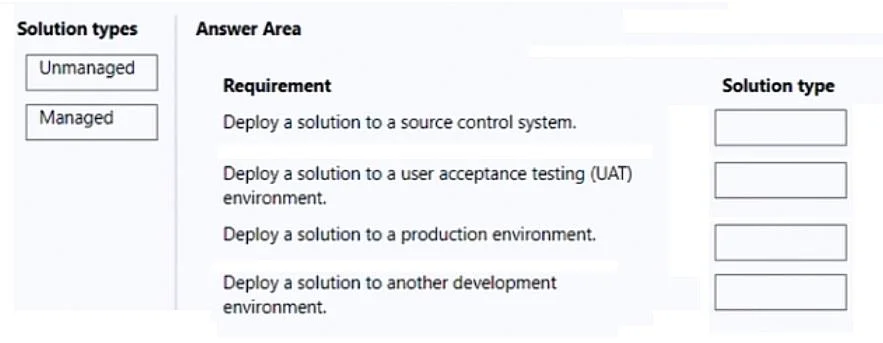
Drag and Drop Question You develop automation solutions for a company. The company does not permit changes to a deployed solution in user acceptance testing (UAT) and production environments. You need to package the solutions. Which type of solutions should you create? To answer, drag the appropriate solution types to the correct requirements. Each solution type may be used once, more than once, or not at all. You may need to drag the split bar between panes or scroll to view content. NOTE: Each correct selection is worth one point. Answer:
Exhibit
Answer Area
Drag items
Correct arrangement
- Unmanaged
- Managed
- Managed
- Unmanaged
Explanation
The question tests understanding of Managed and Unmanaged solutions, specifically their suitability for different environments based on whether changes are permitted post-deployment.
Approach. The core constraint given is that 'the company does not permit changes to a deployed solution in user acceptance testing (UAT) and production environments.' This constraint dictates the use of 'Managed' solutions for these environments because managed solutions are not editable in the target environment after deployment, providing stability and enforcing controlled changes via ALM.
- Deploy a solution to a source control system: Source control systems store the developmental version of a solution, which is expected to be modified. An 'Unmanaged' solution is the editable, source-level form of a solution that can be checked into source control. So, 'Unmanaged' is dragged to this requirement.
- Deploy a solution to a user acceptance testing (UAT) environment: As per the company policy, no changes are permitted in UAT. 'Managed' solutions prevent direct modification in the target environment, making them suitable for UAT. So, 'Managed' is dragged to this requirement.
- Deploy a solution to a production environment: Similar to UAT, no changes are permitted in production. 'Managed' solutions are designed for production environments to ensure stability and that all changes come through a controlled deployment process. So, 'Managed' is dragged to this requirement.
- Deploy a solution to another development environment: Development environments are where solutions are actively built and iterated upon. Developers need to make direct changes, which 'Unmanaged' solutions allow. So, 'Unmanaged' is dragged to this requirement.
Common mistakes.
- common_mistake. A common mistake is to confuse the characteristics of Managed and Unmanaged solutions regarding editability. For instance, dragging 'Unmanaged' to UAT or production environments would be incorrect because unmanaged solutions are fully editable in the target environment, which violates the company's stated policy of not permitting changes in those environments. Conversely, dragging 'Managed' to source control or development environments would be inefficient or incorrect, as managed solutions are not intended for environments where active development and direct modifications are required; they are for deployment to downstream, stable environments. Using a managed solution in a development environment would restrict developers from making changes, hindering the development process. For source control, the 'source' or editable version is typically unmanaged.
Concept tested. Managed and Unmanaged solutions in Microsoft Power Platform (Dynamics 365, Power Apps, Power Automate) Application Lifecycle Management (ALM) practices, specifically their purpose and usage across different development, testing, and production environments.
Topics
Community Discussion
No community discussion yet for this question.