
PL-500 · Question #76
Drag and Drop Question You are developing automation solutions for a company. You need to use an environment variable in a cloud flow. Which three actions should you perform in sequence? To answer…
The correct answer is Navigate to https://flow.microsoft.com.; Create a cloud flow in a solution.; Add an environment variable to a solution.; Select the desired environment variable. The correct sequence for using an environment variable in a cloud flow involves navigating to Power Automate, creating a solution-aware flow, and then referencing the already-existing environment variable within that flow.
Question
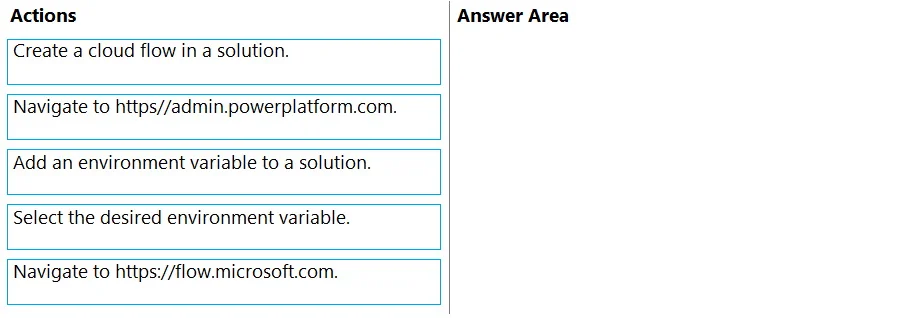
Drag and Drop Question You are developing automation solutions for a company. You need to use an environment variable in a cloud flow. Which three actions should you perform in sequence? To answer, move the appropriate actions from the list of actions to the answer area and arrange them in the correct order. Answer:
Exhibit
Answer Area
Drag items
Correct arrangement
- Navigate to https://flow.microsoft.com.
- Create a cloud flow in a solution.
- Add an environment variable to a solution.
- Select the desired environment variable.
Explanation
The correct sequence for using an environment variable in a cloud flow involves navigating to Power Automate, creating a solution-aware flow, and then referencing the already-existing environment variable within that flow.
Approach. The correct interaction is to drag the following three actions, in this precise order, into the 'Answer Area':
- Navigate to https://flow.microsoft.com. - This is the primary portal for Power Automate, where cloud flows are created and managed. Accessing this portal is the foundational step to begin working with flows.
- Create a cloud flow in a solution. - To effectively use environment variables, which are solution-aware components, the cloud flow itself should be created within a Power Platform solution. This ensures proper Application Lifecycle Management (ALM) and connectivity to other solution components.
- Select the desired environment variable. - Once the cloud flow is created within a solution, you can then add actions (e.g., 'Get an environment variable' action from the Dataverse connector) and reference the specific environment variable that is also part of the same solution. This step represents the actual 'use' of the environment variable within the flow's logic.
Common mistakes.
- common_mistake. A common mistake would be to include 'Add an environment variable to a solution' as one of the three steps. While creating the variable is a prerequisite, the question asks for actions to 'use' an environment variable, implying it already exists or is available. If the task explicitly required creation, the wording would likely be 'create and use'. Another incorrect choice is 'Navigate to https://admin.powerplatform.com.', as this portal is for administrative tasks like environment management, not for direct creation or interaction with cloud flows or solution components like environment variables. Including either of these would either misinterpret the scope of 'use' or select an irrelevant portal for the task at hand.
Concept tested. This question tests the candidate's understanding of Power Automate cloud flow creation, the importance of Power Platform solutions for ALM, and the correct procedure for referencing and utilizing environment variables within cloud flows. It also assesses knowledge of the specific Power Platform portals (Power Automate vs. Power Platform Admin Center) and their respective functions.
Topics
Community Discussion
No community discussion yet for this question.