
PL-500 · Question #81
Drag and Drop Question You deploy a cloud flow to a production environment. You make changes to the cloud flow in a development environment. You import the updated solution to the production…
The correct answer is In the production environment, navigate to the solution contents.; Select the cloud flow that was upgraded.; Show solution layers.; Remove all unmanaged layers. To resolve a cloud flow update issue in a production environment, the user must navigate to the problematic flow, inspect its solution layers, and remove any unmanaged layers that are preventing the managed update from being applied.
Question
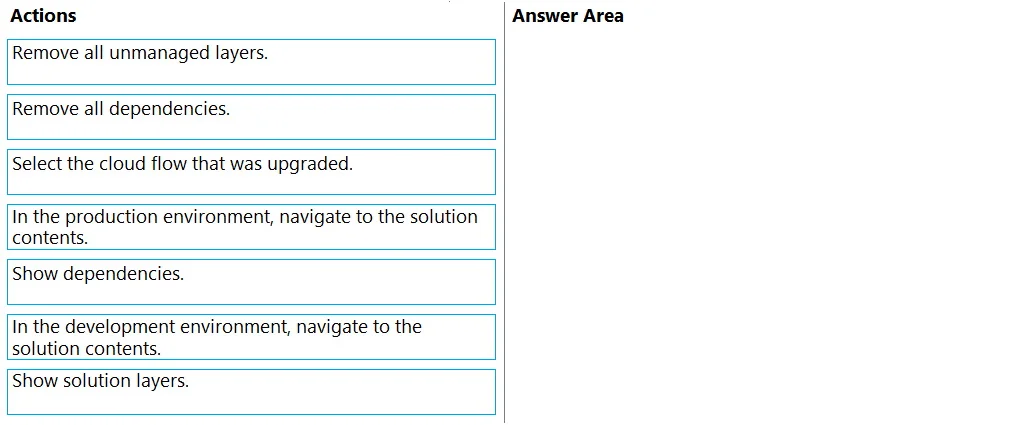
Drag and Drop Question You deploy a cloud flow to a production environment. You make changes to the cloud flow in a development environment. You import the updated solution to the production environment. You observe that the cloud flow is not updated. You need to resolve the issue. Which four actions should you perform in sequence? To answer, move the appropriate actions from the list of actions to the answer area and arrange them in the correct order. Answer:
Exhibit
Answer Area
Drag items
Correct arrangement
- In the production environment, navigate to the solution contents.
- Select the cloud flow that was upgraded.
- Show solution layers.
- Remove all unmanaged layers.
Explanation
To resolve a cloud flow update issue in a production environment, the user must navigate to the problematic flow, inspect its solution layers, and remove any unmanaged layers that are preventing the managed update from being applied.
Approach. The scenario describes a situation where an updated cloud flow, imported as part of a solution, fails to update in the production environment. This is a classic symptom of an unmanaged layer existing in the production environment that is overriding the managed solution's updates. To resolve this, the unmanaged layer must be removed. The correct sequence of actions is:
- In the production environment, navigate to the solution contents. - The problem is occurring in production, so the first step is to go to the environment and the solution where the problematic flow resides.
- Select the cloud flow that was upgraded. - Once in the solution, you need to identify and select the specific component (the cloud flow) that is not updating correctly.
- Show solution layers. - After selecting the component, you need to examine its solution layers to determine if an unmanaged layer is present and causing the issue. This feature provides a detailed view of all layers applied to that component.
- Remove all unmanaged layers. - If an unmanaged layer is found for the selected cloud flow, removing it will revert the component to its state as defined by the underlying managed solution, thereby allowing the imported updates to take effect.
Common mistakes.
- common_mistake. Common mistakes would involve selecting actions that don't directly address the unmanaged layer problem or performing them in the wrong order. For example:
- 'Remove all dependencies.' or 'Show dependencies.': While dependencies are important, they are not the root cause of an update failure due to an unmanaged layer. Removing dependencies without understanding their impact could break the solution.
- 'In the development environment, navigate to the solution contents.': The problem is in the production environment, so investigating the development environment won't help resolve the live issue. The changes were already made in dev and imported.
- Incorrect order: Attempting to 'Remove all unmanaged layers' before selecting the specific component or showing its layers would be an illogical and ineffective approach, as the system wouldn't know which component's layers to target or why it's necessary.
Concept tested. Power Platform solution layering, understanding managed and unmanaged solutions, and resolving update conflicts caused by unmanaged customizations in a production environment. Specifically, the ability to diagnose and fix issues related to component updates being blocked by unmanaged layers.
Topics
Community Discussion
No community discussion yet for this question.