
PL-500 · Question #82
Drag and Drop Question A company has a business-critical desktop flow that runs on a single machine. The number of daily runs for the flow has significantly increased recently. Users report that the…
The correct answer is In the production environment, navigate to the solution contents.; Select the cloud flow that was upgraded.; Show solution layers.; Remove all unmanaged layers. To scale a Power Automate desktop flow from a single machine, provision new machines, install Power Automate, register machines into a new group, and then update the cloud flow connection to use this group.
Question
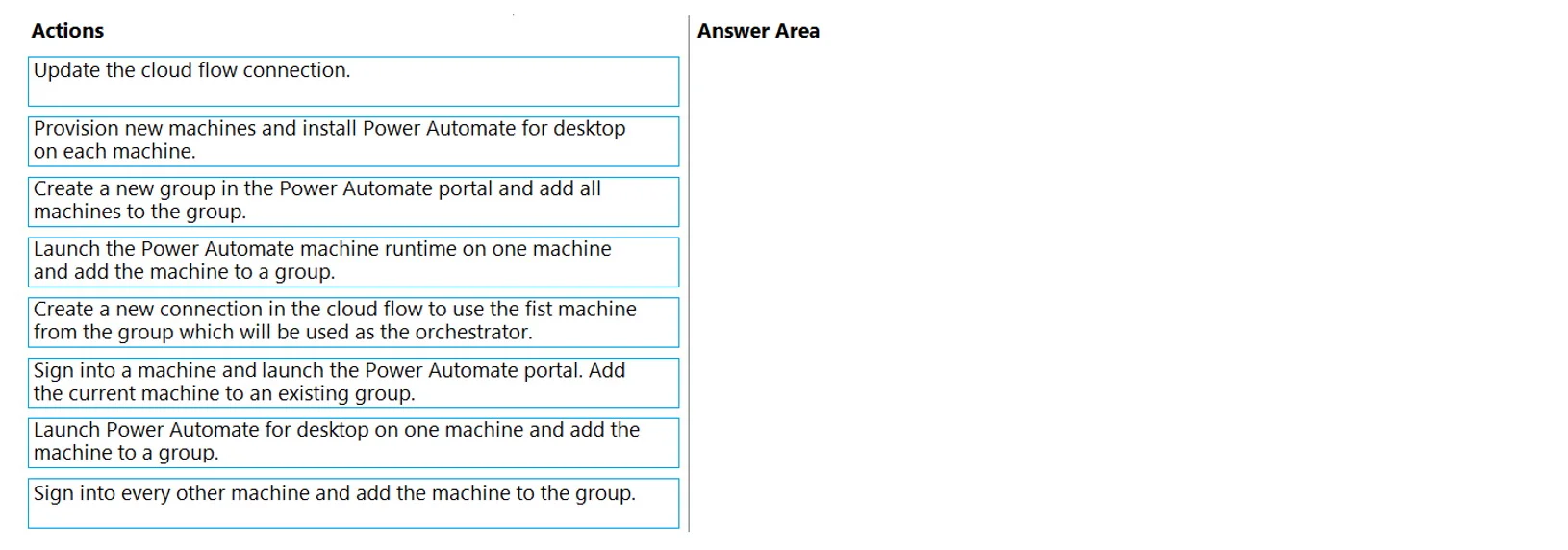
Drag and Drop Question A company has a business-critical desktop flow that runs on a single machine. The number of daily runs for the flow has significantly increased recently. Users report that the time required for the flow to complete is no longer acceptable. You need to scale the solution. Which four actions should you perform in sequence? To answer, move the appropriate actions from the list of actions to the answer area and arrange them in the correct order. Answer:
Exhibit
Answer Area
Drag items
Correct arrangement
- In the production environment, navigate to the solution contents.
- Select the cloud flow that was upgraded.
- Show solution layers.
- Remove all unmanaged layers.
Explanation
To scale a Power Automate desktop flow from a single machine, provision new machines, install Power Automate, register machines into a new group, and then update the cloud flow connection to use this group.
Approach. The correct approach for scaling a Power Automate desktop flow involves setting up a machine group to distribute the workload. The four actions must be performed in the following sequence:
- Provision new machines and install Power Automate for desktop on each machine.
- Reasoning: This is the foundational step. Before any scaling can occur, the necessary infrastructure (additional machines) must be available, and the Power Automate for desktop application, which executes the flows, must be installed on each new machine.
- Launch the Power Automate machine runtime on one machine and add the machine to a group.
- Reasoning: After provisioning, one of the machines needs to be registered with Power Automate. During this initial registration from the Power Automate for desktop client, a new machine group will typically be created, and this first machine will become its initial member. The 'machine runtime' is the component responsible for executing flows.
- Sign into every other machine and add the machine to the group.
- Reasoning: Once the machine group has been initiated with the first machine, the remaining provisioned machines must be individually registered and added to this existing machine group. This expands the capacity of the group.
- Update the cloud flow connection.
- Reasoning: The original cloud flow was configured to run on a single machine. To leverage the newly created and populated machine group for parallel execution or load balancing, the cloud flow's desktop flow connection must be updated to point to this new machine group. This allows the cloud flow to distribute subsequent desktop flow runs across the group members.
Common mistakes.
-
common_mistake. Common mistakes include incorrect sequencing of actions or choosing options that misinterpret Power Automate's machine group functionality.
-
'Create a new group in the Power Automate portal and add all machines to the group': While a group can be created in the portal, the actual registration and 'adding' of machines to the group is primarily done from the Power Automate for desktop client on each individual machine, not as a bulk action directly from the portal itself for registration purposes. The chosen sequence accurately reflects the client-side registration process.
-
'Create a new connection in the cloud flow to use the fist machine from the group which will be used as the orchestrator': This is technically incorrect. Cloud flow connections for desktop flows point to a machine group, not to a single 'orchestrator' machine within the group. The group itself handles the distribution of runs (either load-balanced or sequentially) among its members.
-
'Sign into a machine and launch the Power Automate portal. Add the current machine to an existing group': This is incorrect for two reasons: firstly, the scenario implies scaling from a single machine, so a new group is needed, not adding to an 'existing' one from an operational perspective of scaling out. Secondly, machine registration is typically done via the Power Automate for desktop application installed on the machine, not by launching the web portal from the machine to add itself.
-
Updating the cloud flow connection too early: The cloud flow connection cannot be updated to use a machine group until that group has been established and populated with machines. This must be the final step after the infrastructure is ready.
Concept tested. The core technical concept being tested is scaling Power Automate desktop flows using machine groups. This includes understanding the sequential steps involved in provisioning infrastructure, registering machines, creating/managing machine groups, and updating cloud flow connections to utilize these groups for distributed execution of desktop flows.
Topics
Community Discussion
No community discussion yet for this question.