
PL-500 · Question #72
Drag and Drop Question A company publishes a list of contacts each day as an HTML table on a web page. The company has a customer relationship management (CRM) application that runs on employee…
The correct answer is Launch a new web browser instance.; Use the Extract data from web page action to read data from the HTML table into a variable.; Use the Run application action to start the CRM application.; Use a For each loop to write data from the variable to the CRM application. An RPA solution to transfer data from a web HTML table to a desktop CRM application requires launching a browser, extracting web data, launching the CRM, and then iterating to input the data.
Question
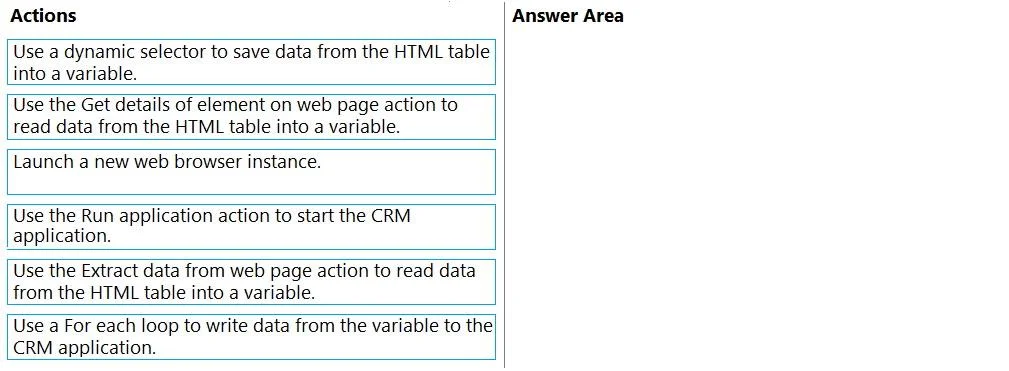
Drag and Drop Question A company publishes a list of contacts each day as an HTML table on a web page. The company has a customer relationship management (CRM) application that runs on employee desktop devices. You need to implement an RPA solution that reads data from the HTML table and create records in the CRM application. Which four actions should you perform in sequence? To answer, move the appropriate actions from the list of actions to the answer area and arrange them in the correct order. Answer:
Exhibit
Answer Area
Drag items
Correct arrangement
- Launch a new web browser instance.
- Use the Extract data from web page action to read data from the HTML table into a variable.
- Use the Run application action to start the CRM application.
- Use a For each loop to write data from the variable to the CRM application.
Explanation
An RPA solution to transfer data from a web HTML table to a desktop CRM application requires launching a browser, extracting web data, launching the CRM, and then iterating to input the data.
Approach. The correct interaction is to drag the following four actions into the 'Answer Area' in the specified order:
- Launch a new web browser instance. - To access the web page containing the HTML table, the RPA bot first needs to open a web browser. This is the foundational step for any web-based automation.
- Use the Extract data from web page action to read data from the HTML table into a variable. - Once the browser is launched and navigated to the correct page, the next logical step is to extract the required data. The 'Extract data from web page' action is specifically designed in RPA tools to extract structured data, such as HTML tables, into a variable (often a data table or list of rows).
- Use the Run application action to start the CRM application. - After successfully extracting the data from the web page, the bot needs to interact with the target application, the CRM, which is a desktop application. The 'Run application' action is used to launch desktop applications.
- Use a For each loop to write data from the variable to the CRM application. - With the CRM application running and the data extracted into a variable, the final step is to process each record from the extracted data and input it into the CRM. A 'For each loop' is essential to iterate through the rows of the extracted data (e.g., each contact) and perform actions (like filling forms or creating new records) within the CRM for each item.
Common mistakes.
- common_mistake. Using 'Use a dynamic selector to save data from the HTML table into a variable' is incorrect because dynamic selectors are for element identification, not for structured data extraction. Using 'Use the Get details of element on web page action to read data from the HTML table into a variable' is wrong because 'Get details' retrieves attributes of a single element, not an entire structured table. An incorrect order, such as launching the CRM before extracting data from the web page, would also be wrong because the RPA solution must first obtain the data from the source before it can write that data to the destination.
Concept tested. Robotic Process Automation (RPA) workflow design, specifically data extraction from web pages and data input into desktop applications, including the correct sequence of actions for web and desktop automation tasks.
Topics
Community Discussion
No community discussion yet for this question.