
PL-500 · Question #157
Drag and Drop Question You design an attended Power Automate desktop flow that updates orders in an order enterprise resource planning (ERP) system. A warehouse supervisor enters the order status…
The correct answer is Create the desktop shortcut for the flow.; Launch the flow using the desktop shortcut.; Dismiss the External invocation warning message.; Enter the order status and fulfillment date values when prompted. The correct sequence of actions for an attended Power Automate desktop flow triggered by a shortcut involves creating the shortcut, launching it, handling security prompts, and providing necessary input.
Question
Drag and Drop Question You design an attended Power Automate desktop flow that updates orders in an order enterprise resource planning (ERP) system. A warehouse supervisor enters the order status and fulfilment date when an order is fulfilled. The flow must be installed on a desktop computer in the warehouse and triggered by using a shortcut. You need to configure the flow to deploy and run. Which four actions should you perform in sequence? To answer, move the appropriate actions from the list of actions to the answer area and arrange them in the correct order. Answer:
Exhibit
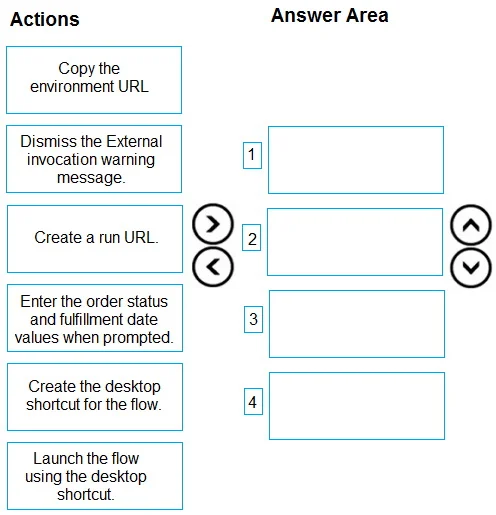
Answer Area
Drag items
Correct arrangement
- Create the desktop shortcut for the flow.
- Launch the flow using the desktop shortcut.
- Dismiss the External invocation warning message.
- Enter the order status and fulfillment date values when prompted.
Explanation
The correct sequence of actions for an attended Power Automate desktop flow triggered by a shortcut involves creating the shortcut, launching it, handling security prompts, and providing necessary input.
Approach. To answer, the appropriate actions must be dragged from the 'Actions' list to the 'Answer Area' and arranged in the following sequence:
- Create the desktop shortcut for the flow: The scenario explicitly states that the flow 'must be installed on a desktop computer in the warehouse and triggered by using a shortcut'. Therefore, creating the shortcut is the initial setup step to enable this triggering mechanism.
- Launch the flow using the desktop shortcut: Once the shortcut is created, the next logical step for the warehouse supervisor to execute the flow is to activate this shortcut.
- Dismiss the External invocation warning message: When an attended desktop flow is launched via an external method, such as a shortcut, Power Automate Desktop typically displays a security warning message. The user must acknowledge and dismiss this warning to allow the flow to proceed with its execution.
- Enter the order status and fulfilment date values when prompted: The problem description mentions that 'A warehouse supervisor enters the order status and fulfilment date when an order is fulfilled'. This indicates that the flow is designed to prompt the user for these specific inputs during its runtime, which occurs after the flow has successfully launched and any initial warnings have been addressed.
Common mistakes.
- common_mistake. Common mistakes include selecting actions that are not directly part of the user's interaction sequence for running the flow via a shortcut, or arranging the chosen actions in an illogical order. For instance, 'Copy the environment URL' and 'Create a run URL' are related to generating a URL for flow invocation, but the question specifically asks for actions to 'deploy and run' via an existing or to be created desktop shortcut. While a run URL might be used internally by a shortcut, these steps are typically pre-requisites for shortcut creation or alternative invocation methods, not part of the sequential user interaction for running the flow once the shortcut is established. Incorrect sequencing, such as attempting to 'Dismiss the External invocation warning message' before 'Launch the flow using the desktop shortcut' or entering data before the flow is running, would be incorrect as these steps depend on prior actions having occurred.
Concept tested. This question tests the candidate's understanding of the deployment and execution lifecycle of attended Power Automate Desktop flows, specifically when triggered by a desktop shortcut. It assesses knowledge of the user interaction steps involved, including creating triggers, launching flows, handling security prompts for external invocations, and providing user input during flow execution.
Topics
Community Discussion
No community discussion yet for this question.