
PL-500 · Question #158
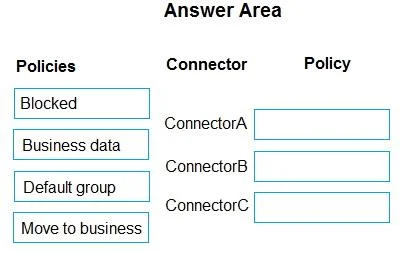
Drag and Drop Question You are setting up a data loss prevention (DLP) policy for an environment. The default policy group is set to Non-business. You must configure the following connectors in the…
The correct answer is ConnectorA: Business data; ConnectorB: Default group; ConnectorC: Blocked. The question requires matching connectors to appropriate Data Loss Prevention (DLP) policies based on their current and future data handling requirements and status.
Question
Drag and Drop Question You are setting up a data loss prevention (DLP) policy for an environment. The default policy group is set to Non-business. You must configure the following connectors in the policy:
- ConnectorA will be used for tracking business-sensitive data.
- ConnectorB will be deployed in six months and must be automatically added to the published
policy.
- ConnectorC uses a custom connector. The connector uses personal data for testing. When
testing is complete, the connector will connect to business-sensitive data. You need to select the appropriate policy for each connector. Which policy should you use for each connector? To answer, drag the appropriate policies to the correct connectors. Each policy may be used once, more than once, or not at all. You may need to drag the split bar between panes or scroll to view content. NOTE: Each correct selection is worth one point. Answer:
Exhibit
Answer Area
Drag items
Correct arrangement
- ConnectorA: Business data
- ConnectorB: Default group
- ConnectorC: Blocked
Explanation
The question requires matching connectors to appropriate Data Loss Prevention (DLP) policies based on their current and future data handling requirements and status.
Approach. The correct interaction is to drag the appropriate policy from the 'Policies' column to the policy drop zone next to each connector based on the scenario described:
- ConnectorA: The requirement states 'ConnectorA will be used for tracking business-sensitive data.' The policy 'Business data' directly aligns with this purpose, indicating that the connector is intended to handle sensitive business information.
- ConnectorB: The requirement states 'ConnectorB will be deployed in six months and must be automatically added to the published policy.' The question also notes 'The default policy group is set to Non-business.' For a connector that needs to be automatically added to the published policy upon deployment without specific immediate classification, assigning it to the 'Default group' ensures it adheres to the default handling, which is typically non-business data, until explicitly reclassified.
- ConnectorC: The requirement states 'ConnectorC uses a custom connector. The connector uses personal data for testing. When testing is complete, the connector will connect to business-sensitive data.' A custom connector, especially one in a testing phase and handling personal data (which can be sensitive), should be treated with extreme caution. Blocking it ('Blocked' policy) during the testing phase with personal data and before it's validated for business-sensitive data is a secure and prudent approach. This prevents potential data leaks or unauthorized access during development and testing until it's properly vetted and ready to be assigned a 'Business data' or 'Move to business' policy.
Common mistakes.
- common_mistake. Common mistakes include assigning 'Move to business' to ConnectorC too early, as the connector is still in testing with personal data and not yet ready for a full transition to business data. 'Move to business' implies readiness for transition, not an unvalidated custom connector in testing. Assigning 'Business data' to ConnectorC would also be incorrect because it is currently only handling personal data for testing, not business-sensitive data. Using 'Default group' for ConnectorA or ConnectorC would undermine the explicit requirements for handling business-sensitive data or managing a custom, sensitive connector. Assigning 'Blocked' to ConnectorA or B would prevent them from functioning as intended for business data or automatic default inclusion, respectively.
Concept tested. The core concept tested is Data Loss Prevention (DLP) policy configuration in an environment like Microsoft Power Platform, specifically understanding how to classify connectors into data groups (e.g., business, non-business, blocked) and managing the lifecycle of connectors, including custom and future-deployed ones, to prevent data leakage.
Topics
Community Discussion
No community discussion yet for this question.