
PL-200 · Question #61
Drag and Drop Question You plan to automate several different processes by using Power Automate. Each process has unique characteristics. You need to recommend components for each process. Which…
The correct answer is Flow that uses a custom connector; Unattended UI flow. This question assesses the ability to correctly identify and apply Power Automate components like UI flows (attended/unattended) and API connectors (custom/prebuilt) based on specific process characteristics.
Question
Exhibit
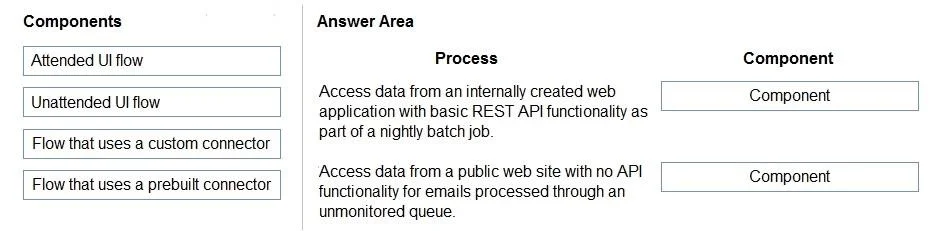
Answer Area
Drag items
Correct arrangement
- Flow that uses a custom connector
- Unattended UI flow
Explanation
This question assesses the ability to correctly identify and apply Power Automate components like UI flows (attended/unattended) and API connectors (custom/prebuilt) based on specific process characteristics.
Approach. For the first process, 'Access data from an internally created web application with basic REST API functionality as part of a nightly batch job.', the correct component is 'Flow that uses a custom connector'. This is because the application is 'internally created', meaning a standard prebuilt connector for it is unlikely to exist. However, since it has 'basic REST API functionality', a custom connector can be developed to interface with its API. The 'nightly batch job' implies an automated, non-UI interaction, making an API-based cloud flow the appropriate choice over a UI flow.
For the second process, 'Access data from a public web site with no API functionality for emails processed through an unmonitored queue.', the correct component is 'Unattended UI flow'. The key phrase 'no API functionality' immediately rules out any connector-based flows (custom or prebuilt). Interacting with a 'public web site' without an API typically requires Robotic Process Automation (RPA), which is handled by UI flows. The 'unmonitored queue' aspect signifies that the process must run without human intervention or supervision, thus requiring an 'Unattended UI flow' rather than an 'Attended UI flow'.
Common mistakes.
- common_mistake. Using 'Attended UI flow' for either process would be incorrect because both scenarios imply automation without human supervision- 'nightly batch job' and 'unmonitored queue' denote unattended execution. 'Flow that uses a prebuilt connector' would be incorrect for the first process because it's an 'internally created web application' that likely lacks a public prebuilt connector, requiring a custom one. For the second process, any connector-based flow (prebuilt or custom) is wrong because the process explicitly states 'no API functionality'. A common mistake would be to confuse when to use custom vs. prebuilt connectors or when to use UI flows vs. cloud flows (API-based flows), or to misinterpret the attended vs. unattended requirement for UI flows.
Concept tested. The underlying technical concepts being tested are: 1. Differentiating between UI flows (Robotic Process Automation for user interface interaction) and cloud flows (for API-based integration). 2. Understanding the distinction between Attended UI flows (requiring human supervision) and Unattended UI flows (running autonomously). 3. Knowing when to use a Custom Connector (for proprietary or unique APIs) versus a Prebuilt Connector (for common services with existing integrations). 4. Ability to choose the most suitable Power Automate component based on the target system's characteristics (API availability, internal vs. public) and the automation's operational requirements (supervised vs. unsupervised, batch vs. real-time).
Topics
Community Discussion
No community discussion yet for this question.