
PL-200 · Question #120
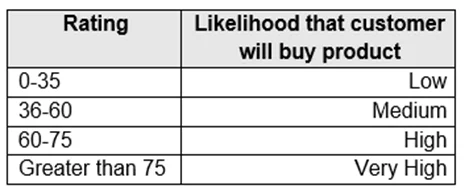
Drag and Drop Question A company is creating a business process flow in Power Automate to analyze the probability that a customer will buy a specific product. The company uses ratings from zero to…
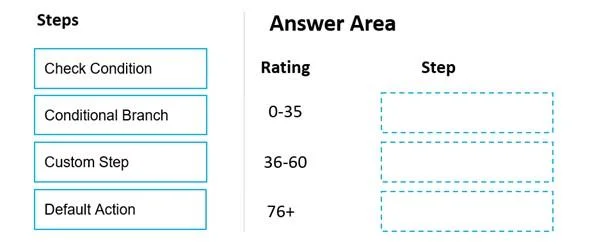
The correct answer is Conditional Branch; Conditional Branch; Default Action. To implement cascading conditional logic in a Power Automate business process flow for different rating ranges, 'Conditional Branch' steps are used for specific conditions, followed by a 'Default Action' to catch all remaining cases.
Question
Exhibits
Answer Area
Drag items
Correct arrangement
- Conditional Branch
- Conditional Branch
- Default Action
Explanation
To implement cascading conditional logic in a Power Automate business process flow for different rating ranges, 'Conditional Branch' steps are used for specific conditions, followed by a 'Default Action' to catch all remaining cases.
Approach. The question requires defining business process steps for different rating ranges, with all logic in a single evaluation statement. This implies a cascading 'if-else if-else' structure. In Power Automate business process flows, 'Conditional Branch' is the appropriate step to define a specific path based on a condition. For the first two distinct rating ranges (0-35 and 36-60), 'Conditional Branch' is used to evaluate if the rating falls within these specific ranges. If a rating does not meet the conditions of the preceding conditional branches, it falls into a 'catch-all' category. The 'Default Action' step is designed for this purpose, acting as the 'else' part of the conditional logic. Therefore, '0-35' and '36-60' are assigned 'Conditional Branch' steps, and the remaining '76+' category (which covers all ratings greater than 60, as 60-75 is omitted and 76+ is the last available slot) is assigned 'Default Action'.
Common mistakes.
- common_mistake. Using 'Check Condition' would be incorrect because, while it evaluates conditions, 'Conditional Branch' is the specific and more appropriate construct within a Power Automate business process flow to define branching logic. 'Custom Step' is for executing specific actions, not for defining the conditional branching logic itself. Assigning 'Default Action' to an earlier, specific rating range like '0-35' or '36-60' would be wrong because 'Default Action' is meant to capture all scenarios not explicitly covered by preceding conditional branches, acting as the final 'else' statement in a sequential evaluation.
Concept tested. Implementing conditional logic and branching within Power Automate business process flows, specifically understanding the roles of 'Conditional Branch' and 'Default Action' in creating a single, cascading evaluation statement.
Topics
Community Discussion
No community discussion yet for this question.