
PL-200 · Question #65
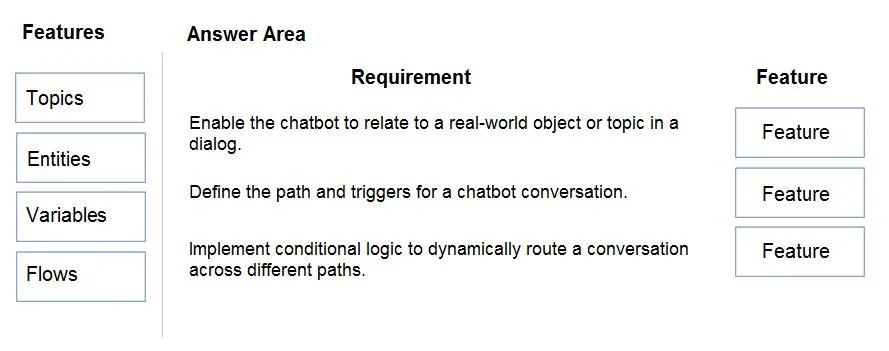
Drag and Drop Question You are designing a chatbot for a sports outlet. You need to complete the chatbot. Which features should you use? To answer, drag the appropriate features to the correct…
The correct answer is Entities; Topics; Variables. This question assesses the test-taker's understanding of core chatbot features and their respective functionalities in designing a conversational AI.
Question
Exhibit
Answer Area
Drag items
Correct arrangement
- Entities
- Topics
- Variables
Explanation
This question assesses the test-taker's understanding of core chatbot features and their respective functionalities in designing a conversational AI.
Approach. The correct interaction is to drag 'Entities' to the first requirement, 'Topics' to the second, and 'Variables' to the third.
- 'Enable the chatbot to relate to a real-world object or topic in a dialog.' -> Entities: Entities are used in chatbot design to identify and extract specific pieces of information, such as names, dates, locations, product types, or other real-world concepts, from a user's input. This allows the bot to understand the context and specific details of a user's request.
- 'Define the path and triggers for a chatbot conversation.' -> Topics: Topics are fundamental building blocks of a chatbot. They define the subject areas the bot can converse about, including the trigger phrases that initiate the conversation for that topic and the detailed conversational flow (dialog path) that the bot follows.
- 'Implement conditional logic to dynamically route a conversation across different paths.' -> Variables: Variables are used to store data and information gathered during a conversation, such as user input, system data, or results from API calls. This stored data can then be used in conditional statements (e.g., 'If Variable A is 'X', then take Path 1; else, take Path 2') to dynamically steer the conversation down different paths based on the context or user's choices.
Common mistakes.
- common_mistake. Using 'Flows' or misplacing the other options would be incorrect.
- Flows (often referring to Power Automate flows in Microsoft contexts) are typically used for extending the bot's capabilities by integrating with external services, performing complex multi-step actions, or automating business processes, rather than directly implementing the core conversational path, triggers, or conditional logic within the bot's immediate dialog. While a flow might use variables and be triggered from a topic, it doesn't define the conditional logic within the bot's direct conversation path in the way variables do.
- Swapping 'Topics' and 'Entities' would be incorrect because topics define the overall conversational subject and path, while entities extract specific data points within those conversations.
- Using 'Flows' for conditional logic would be less direct than 'Variables', as variables are the primary mechanism within the bot's dialog for holding data that conditions are evaluated against.
Concept tested. Core components and functionalities of a conversational AI or chatbot platform, specifically understanding how topics, entities, and variables are used to build and manage dynamic chatbot interactions.
Topics
Community Discussion
No community discussion yet for this question.