
PL-200 · Question #70
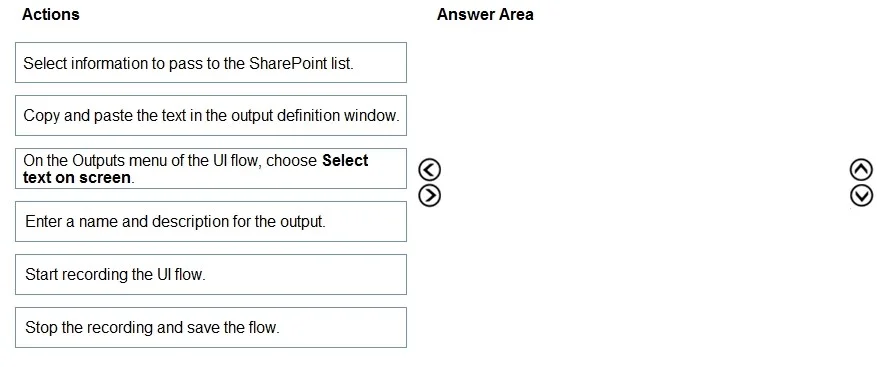
Drag and Drop Question You are designing a desktop user interface (Ul) flow. The Ul flow automates legacy software. You need to prepare data for transfer to a Microsoft SharePoint list. Which four…
The correct answer is Start recording the UI flow.; On the Outputs menu of the UI flow, choose Select text on screen.; Select information to pass to the SharePoint list.; Enter a name and description for the output. The correct sequence for preparing data output in a UI flow involves starting the recording, initiating screen text selection, performing the selection, and then naming the captured output.
Question
Exhibit
Answer Area
Drag items
Correct arrangement
- Start recording the UI flow.
- On the Outputs menu of the UI flow, choose Select text on screen.
- Select information to pass to the SharePoint list.
- Enter a name and description for the output.
Explanation
The correct sequence for preparing data output in a UI flow involves starting the recording, initiating screen text selection, performing the selection, and then naming the captured output.
Approach. The correct interaction is to drag the following four actions into the 'Answer Area' and arrange them in this specific sequence:
- Start recording the UI flow. - This is the foundational step for any UI automation recording. You must initiate recording before performing any actions on the target application or defining outputs.
- On the Outputs menu of the UI flow, choose Select text on screen. - After starting the recording, the next logical step to prepare data for transfer (an 'output') is to tell the UI flow what kind of output you want to capture. 'Select text on screen' indicates that you intend to capture visible text from the UI.
- Select information to pass to the SharePoint list. - Once 'Select text on screen' is chosen, the system then expects the user to actively select the specific text or UI element on the desktop application that contains the data intended for the SharePoint list.
- Enter a name and description for the output. - After the information is selected, it needs to be properly defined within the UI flow. Assigning a name and description allows the captured data to be identified and used as an output variable in subsequent actions or transfers (e.g., to a SharePoint list). This finalizes the definition of the output.
This sequence directly addresses the requirement of 'preparing data for transfer' by defining an output within the UI flow.
Common mistakes.
- common_mistake. Common mistakes include incorrectly ordering the steps or selecting irrelevant actions. For instance:
- 'Stop the recording and save the flow.' is incorrect because this action comes after all outputs have been defined and the desired UI interactions have been recorded. The question specifically asks for actions to 'prepare data for transfer' (i.e., define outputs), not to finalize the entire flow.
- 'Copy and paste the text in the output definition window.' is generally incorrect in the context of 'Select text on screen'. When using a 'select on screen' feature, the tool typically captures the text directly from the selected UI element, rather than requiring a manual copy-paste into a separate definition window. This action would be more relevant if manually inputting data or configuring a static output, not dynamically capturing screen text.
Concept tested. The core concept being tested is the sequential process of defining and capturing output data within a desktop UI automation flow (e.g., using Power Automate Desktop or similar Robotic Process Automation tools), specifically for screen-based data extraction.
Topics
Community Discussion
No community discussion yet for this question.