
PL-200 · Question #83
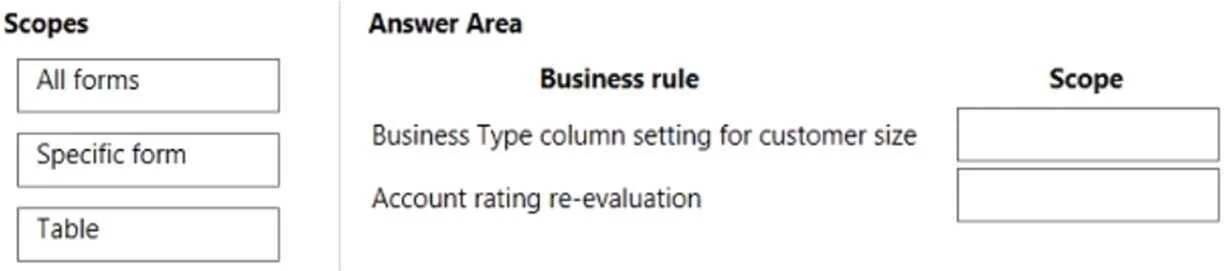
Drag and Drop Question A company is creating a canvas app and a model-driven app to manage their customer accounts. The canvas app requires a business rule to set the Business Type column to large…
The correct answer is Table; Specific form. The question tests understanding of Power Apps Business Rule scopes: 'Table' scope applies universally across all data interactions including canvas apps, while 'Specific form' scope targets UI-driven behavior within a particular model-driven app form.
Question
Exhibit
Answer Area
Drag items
Correct arrangement
- Table
- Specific form
Explanation
The question tests understanding of Power Apps Business Rule scopes: 'Table' scope applies universally across all data interactions including canvas apps, while 'Specific form' scope targets UI-driven behavior within a particular model-driven app form.
Approach. 1. For the 'Business Type column setting for customer size' business rule: The scenario states that this rule is required for a canvas app. Canvas apps interact directly with the underlying data table in Dataverse and do not use model-driven app forms. Therefore, to ensure the business rule executes regardless of whether the data is manipulated via the canvas app, a model-driven app form, or an API, the scope must be set to 'Table'. This ensures the rule is applied at the server-side, whenever the record is created or updated. Drag 'Table' to this business rule.
- For the 'Account rating re-evaluation' business rule: The scenario specifies that this rule is for a 'model-driven app' and, crucially, 'for this app only'. Furthermore, it describes a 'recommendation'. Recommendations are typically user interface (UI) driven and client-side. Applying the rule to a 'Specific form' allows it to be targeted precisely to a particular form within the specific model-driven app that requires this recommendation, without affecting other forms or data interactions outside that form. Drag 'Specific form' to this business rule.
Common mistakes.
- common_mistake. 1. Using 'All forms' or 'Specific form' for the 'Business Type column setting' rule: These scopes only trigger when a record is interacted with through a model-driven app form. Since the rule is also needed for a canvas app, and canvas apps bypass model-driven app forms, the rule would not execute when data is modified via the canvas app, leading to inconsistent data or incorrect behavior.
-
Using 'All forms' for the 'Account rating re-evaluation' rule: While 'All forms' would execute the rule on all forms for that table, the requirement states 'for this app only' and implies a specific recommendation. 'All forms' might be too broad if only one specific form within the designated app is intended to show this recommendation, potentially causing the rule to fire unnecessarily on forms in other model-driven apps or views.
-
Using 'Table' for the 'Account rating re-evaluation' rule: This would cause the rule to execute server-side, regardless of the UI being used (e.g., even via a canvas app or API). Since this is a 'recommendation' for a 'model-driven app only', it implies a UI-specific client-side behavior, which is not suitable for a 'Table' scope that would make it a universal backend logic.
Concept tested. Power Apps (Dataverse) Business Rule scopes and their application. This includes understanding the difference between client-side (form-level) and server-side (table-level) execution of business rules, and how each scope ('Table', 'All forms', 'Specific form') impacts rule execution across different application types (model-driven apps, canvas apps) and data interaction methods (forms, APIs).
Topics
Community Discussion
No community discussion yet for this question.