
PL-200 · Question #84
Drag and Drop Question You need to recommend a role for users to perform several required tasks. The solution must use the principle of least privilege. Which roles should you recommend? To answer…
The correct answer is Office 365 global administrator; Dynamics 365 system administrator; Dynamics 365 service administrator. This question assesses the test-taker's understanding of Microsoft 365 and Dynamics 365 administrative roles and their appropriate application based on the principle of least privilege.
Question
Exhibit
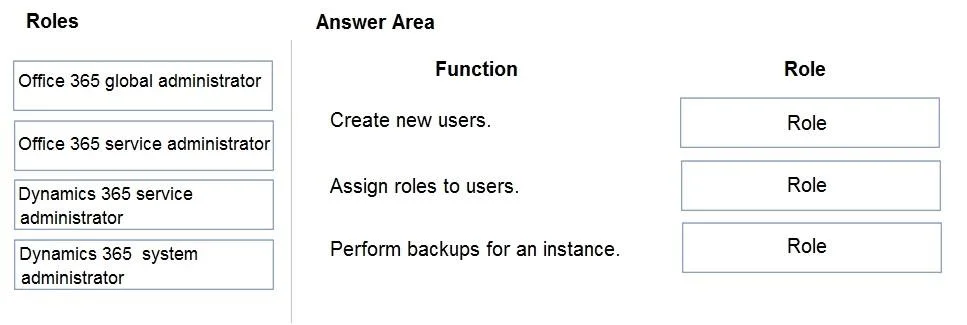
Answer Area
Drag items
Correct arrangement
- Office 365 global administrator
- Dynamics 365 system administrator
- Dynamics 365 service administrator
Explanation
This question assesses the test-taker's understanding of Microsoft 365 and Dynamics 365 administrative roles and their appropriate application based on the principle of least privilege.
Approach. The correct interaction involves dragging the specific roles to the functions they are best suited for, adhering to the principle of least privilege from the given options:
-
For 'Create new users.': Drag 'Office 365 global administrator'.
- Reasoning: Creating new users in a Microsoft 365 tenant (which includes Azure AD users) requires a highly privileged role. Among the given options, 'Office 365 global administrator' (synonymous with Microsoft 365 Global Administrator) is the only role that possesses the necessary permissions to create new users across the tenant. While 'User administrator' would be a more least-privilege role for this specific task, it is not an option. Therefore, 'Office 365 global administrator' is the correct choice among the provided roles.
-
For 'Assign roles to users.': Drag 'Dynamics 365 system administrator'.
- Reasoning: This function implies assigning security roles within a Dynamics 365 instance. The 'Dynamics 365 system administrator' is an in-app role that has full control over a specific Dynamics 365 instance, including the ability to manage and assign security roles to users within that instance. The 'Dynamics 365 service administrator' manages environments but not typically in-app security roles, and Office 365 roles manage tenant-level access, not specific application roles.
-
For 'Perform backups for an instance.': Drag 'Dynamics 365 service administrator'.
- Reasoning: Performing backups for a Dynamics 365 'instance' (which corresponds to a Power Platform environment) is an environment-level administrative task. The 'Dynamics 365 service administrator' (also known as Power Platform Service Administrator) role is responsible for managing Power Platform environments, which includes tasks like performing backups and restores of these environments. The 'Dynamics 365 system administrator' role manages the contents within an instance, not the underlying environment administration.
Common mistakes.
- common_mistake. A common mistake is confusing the scope of different administrative roles, particularly between tenant-level (Office 365) and application-specific (Dynamics 365) roles, or between environment-level (service administrator) and in-app instance-level (system administrator) roles. For example:
- Dragging 'Office 365 service administrator' for any of these tasks would be incorrect as this role primarily deals with service health and support, not user management, role assignment, or instance backups.
- Dragging 'Dynamics 365 system administrator' to 'Perform backups for an instance' is wrong because the System Administrator role is for in-app management, while backups are an environment-level operation handled by the Service Administrator.
- Dragging 'Dynamics 365 service administrator' to 'Assign roles to users' would be incorrect if the roles refer to in-app Dynamics 365 security roles, as the Service Administrator manages environment access, not typically granular in-app security roles.
Concept tested. Role-Based Access Control (RBAC) in Microsoft 365 and Dynamics 365/Power Platform, understanding the specific permissions and scope of administrative roles, and applying the principle of least privilege.
Topics
Community Discussion
No community discussion yet for this question.