nerdexam
Microsoft

PL-200 · Question #333

Case Study 4 - Contoso Suites Background Contoso Suites is an animal shelter that specializes in finding homes for dogs that have been given up by their owners. The shelter can house up to 20 dogs. Th

This drag-and-drop question assesses the understanding of different Dataverse table types and their appropriate use cases based on provided business requirements.

Configure Microsoft Dataverse

Question

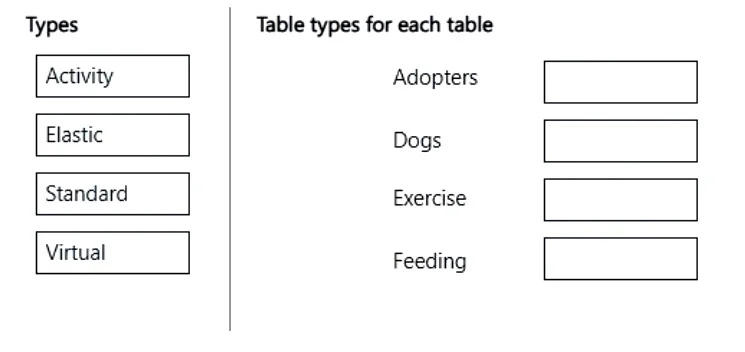
Case Study 4 - Contoso Suites Background Contoso Suites is an animal shelter that specializes in finding homes for dogs that have been given up by their owners. The shelter can house up to 20 dogs. The shelter is implementing one model-driven Power Apps app to track the dogs and schedule meetings with potential adopters. No other apps will be created. The model-driven app uses Dataverse with out-of-the-box functionality when possible. Dataverse is set up with the following configuration: - The solution prefix "cs" is used for all new components. - Only the root business unit is used. - All tables are stored in Dataverse and do not require rapid scaling. - Exchange server-side sync is not configured. Adopters - Adopter information is stored in a Contact table. - Contacts are considered to be duplicates if they have the same email address and last name. - Adopters are often late to meetings, so a reminder email is sent to them two hours before their meeting. - The email reminders must not be tracked in the system. Dogs - Dog information is stored in a Dog table, which is organization owned. - Breed, size, and weight are fields in the table. Dog residency - A Resident table tracks the stay of each dog. - Each resident record has a lookup for the dog and its food. - The food type and amount are logged on each resident record. Auto-posting is not configured for changes to food type and amount. - A fee of $120 is in a currency column named Adoption Fee. This fee can be changed depending on the adoption circumstances. - A formula column named Deposit is automatically populated with 20% of the adoption fee. - A resident record is generated automatically when a dog record is created. This is the only way a resident record can be created. Exercise and feedings - Exercise for the dogs is tracked in an Exercise table. - Feedings are tracked in a Feeding table. - Exercise and feeding records appear in a resident record timeline. Care staff - The care staff must be able to view who changed the food type and the amount that was given, for up to three months ago. - The staff must be able to update the weight of a dog on the resident record. - The staff report that the buttons are too small on the touch screen they use to log exercise and feeding. - The staff must be able to view who the adopters are for upcoming meetings. The staff must not be able to update adopter information. Administrative staff - Administrative staff must receive a weekly list of duplicate contacts. Duplicate alerts must not appear when a staff member saves a new contact. - When an adopter wants to adopt a dog, the staff must perform a series of adoption duties in order. The following duty list must be displayed on the screen: o Commitment: - Obtain adopter signature in a commitment document. - Collect deposit. o Pre-pickup: - Document spay or neutering date. - Perform spay or neutering. - Document pickup date. o Pickup: - Collect full payment. - Verify dog is picked up. o A dog must be picked up no sooner than two days after spaying or neutering. o A pop-up window must appear with an error message if the Pickup date is too soon. o Only administrative staff must be able to add new adopters and dogs. Drag and Drop Question You need to define the table types for Contoso Suites. Which table type should you define for each requirement? To answer, move the appropriate table types to the correct tables. You may use each table type once, more than once, or not at all. You may need to move the split bar between panes or scroll to view content. Answer:

Exhibit

PL-200 question #333 exhibit

Explanation

This drag-and-drop question assesses the understanding of different Dataverse table types and their appropriate use cases based on provided business requirements.

Approach. The correct approach is to drag 'Standard' to 'Adopters' and 'Dogs', and 'Activity' to 'Exercise' and 'Feeding'.

  • Adopters: Adopter information, conceptually representing individuals, is stored in a Contact table. Contacts are primary entities in Dataverse. Even if a custom 'Adopters' table is created, it would serve as a core data store for individuals, making 'Standard' the appropriate table type.
  • Dogs: Dog information is stored in a 'Dog' table, which is a central entity storing attributes like breed, size, and weight. This represents a primary record for an animal, fitting the 'Standard' table type.
  • Exercise: An 'Exercise' record would track an event or interaction (e.g., a dog was walked, when, for how long). Dataverse 'Activity' tables are designed for tracking such interactions, which can be completed, assigned, and shown on a timeline. Therefore, 'Activity' is the correct type.
  • Feeding: The case study states 'The food type and amount are logged on each resident record.' This describes an event or action-a dog being fed. Similar to 'Exercise', this fits the definition of an 'Activity' table, which tracks interactions or events related to other entities. Thus, 'Activity' is the correct type.

The case study explicitly mentions 'All tables are stored in Dataverse and do not require rapid scaling,' which rules out 'Elastic' (for high-volume, rapid-scaling scenarios) and 'Virtual' (for external data sources).

Common mistakes.

  • common_mistake. Common mistakes include incorrectly assigning 'Elastic' or 'Virtual' to tables, or confusing 'Standard' with 'Activity'.

  • Elastic: Selecting 'Elastic' for any table is incorrect because the case study explicitly states that tables 'do not require rapid scaling'. Elastic tables are specifically designed for very high-volume, rapidly changing data that needs extreme scalability and might not require full relational features.

  • Virtual: Selecting 'Virtual' for any table is incorrect because the case study states 'All tables are stored in Dataverse'. Virtual tables are used to bring data from external sources into Dataverse without replicating it.

  • Standard for Exercise/Feeding: Assigning 'Standard' to 'Exercise' or 'Feeding' is incorrect because these tables track events or interactions (what happened, when) related to a dog's residency, rather than being core static entities themselves. Activity tables are purpose-built for this type of transactional, timeline-based data.

  • Activity for Adopters/Dogs: Assigning 'Activity' to 'Adopters' or 'Dogs' is incorrect because these are primary entities (people and animals), not events or interactions. They are typically the 'regarding' entities for activities, meaning activities are performed 'about' them.

Concept tested. Dataverse table types (Standard, Activity, Elastic, Virtual) and their appropriate use cases in a model-driven Power Apps application.

Topics

#Dataverse Table Types#Custom Tables#Data Modeling#Activity Tables

Community Discussion

No community discussion yet for this question.

Full PL-200 Practice