
PL-200 · Question #67
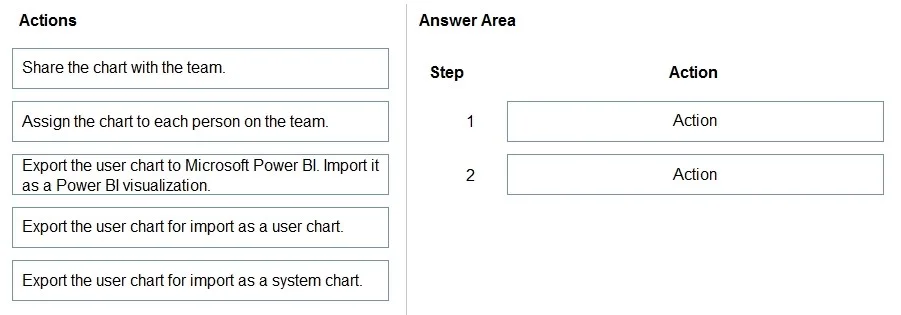
Drag and Drop Question You are a Dynamics 365 Customer Service developer. A salesperson creates a chart. You need to ensure that the chart is available to all users on the team. Which actions should…
The correct answer is Export the user chart for import as a user chart.; Share the chart with the team. To make a salesperson's personal chart available to their team, the salesperson must export the chart definition and then share the chart with the team.
Question
Exhibit
Answer Area
Drag items
Correct arrangement
- Export the user chart for import as a user chart.
- Share the chart with the team.
Explanation
To make a salesperson's personal chart available to their team, the salesperson must export the chart definition and then share the chart with the team.
Approach. The correct interaction involves dragging two specific actions to the answer area in sequence. The goal is for a salesperson to make a user chart available to their team. A salesperson creates user-owned charts, which are personal by default. To achieve team-wide availability, the following steps are performed:
- Drag 'Export the user chart for import as a user chart.' to Step 1. This action allows the salesperson to create a portable XML definition of their personal chart. While not strictly mandatory for direct sharing of an existing chart record in Dynamics 365, it is a valid action a user can perform to 'package' or save their chart's definition. This step can be interpreted as preparing the chart for wider distribution or as a standardized template.
- Drag 'Share the chart with the team.' to Step 2. This is the primary and most direct action for making a personal (user) chart available to specific users or teams in Dynamics 365. By sharing, the team members gain access to view and use the salesperson's chart within their Dynamics 365 environment. The sequence implies that preparing the chart's definition (exporting) precedes the act of granting access to it through sharing, which is often a common practice in IT for distributing personalized configurations or reports.
Common mistakes.
- common_mistake. - Assign the chart to each person on the team: Assigning a chart changes its ownership, which is not the same as sharing. Sharing grants access while retaining original ownership, which is typically preferred for team collaboration on a single chart instance. Assigning to each person would create multiple distinct ownerships, which is not efficient for making a single chart available to a team.
- Export the user chart to Microsoft Power BI. Import it as a Power BI visualization: This option refers to integrating with Microsoft Power BI, which is a separate analytics service. The question specifically concerns the availability of the chart within the native Dynamics 365 environment, not its visualization in Power BI.
- Export the user chart for import as a system chart: A salesperson, as an end-user, does not possess the necessary security roles (e.g., System Customizer or System Administrator) to convert or import a user chart as a system chart. System charts are managed by administrators and are globally available or tied to security roles, not individual user actions for creation or conversion. This option is outside a salesperson's privileges and the scope of a user chart.
- Incorrect sequence: Even if the correct actions were selected, applying them in the wrong order would be incorrect. Sharing is the action that grants availability, and preparing the chart definition (exporting) would logically precede it in a multi-step process for managed distribution.
Concept tested. Dynamics 365 chart management and sharing capabilities, specifically distinguishing between user-owned (personal) charts and system-owned charts, and understanding the permissions and processes for end-users (salespersons) to make personal assets available to teams.
Topics
Community Discussion
No community discussion yet for this question.