
PL-200 · Question #58
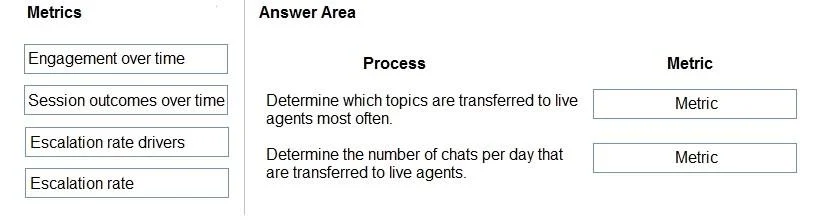
Drag and Drop Question A company creates a Power Virtual Agents chatbot. You need to determine when live agents are engaged to provide support. Which metrics should you use? To answer, drag the…
The correct answer is Escalation rate drivers; Session outcomes over time. The correct metrics for analyzing live agent engagement are 'Escalation rate drivers' to identify problematic topics and 'Session outcomes over time' to track the daily volume of transfers.
Question
Exhibit
Answer Area
Drag items
Correct arrangement
- Escalation rate drivers
- Session outcomes over time
Explanation
The correct metrics for analyzing live agent engagement are 'Escalation rate drivers' to identify problematic topics and 'Session outcomes over time' to track the daily volume of transfers.
Approach. For the process 'Determine which topics are transferred to live agents most often', the 'Escalation rate drivers' metric is the most appropriate. This metric specifically identifies the underlying causes and topics that lead to a bot escalating a conversation to a human agent, allowing administrators to pinpoint problematic areas in the bot's design. For the process 'Determine the number of chats per day that are transferred to live agents', 'Session outcomes over time' is the correct metric. This metric provides a historical view of how sessions conclude, including those that are escalated to a live agent. By viewing this metric over time (e.g., daily), it directly shows the volume of chats that required human intervention.
Common mistakes.
- common_mistake. Using 'Engagement over time' would be incorrect because it tracks overall bot usage (sessions, users) but does not provide details specific to live agent transfers or their drivers. 'Escalation rate' would also be incorrect for either process, as it provides a high-level percentage or total count of escalations but does not detail which topics caused them (which 'Escalation rate drivers' does) nor does it provide a granular, daily trend of the number of escalated chats (which 'Session outcomes over time' does). These metrics lack the specificity required to answer the given processes.
Concept tested. Understanding and interpreting Power Virtual Agents (PVA) analytics and reporting metrics to effectively monitor and improve chatbot performance, specifically concerning live agent handoffs.
Topics
Community Discussion
No community discussion yet for this question.