
PL-200 · Question #57
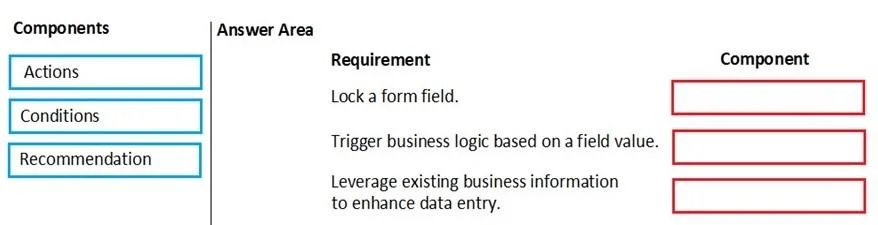
Drag and Drop Question You are a Dynamics 365 for Customer Service administrator. You must create a form for team members to use. The form must provide the ability to: - Lock a field on a form…
The correct answer is Actions; Conditions; Recommendation. This question tests the understanding of the core components of Dynamics 365 Business Rules: Actions, Conditions, and Recommendations, and their specific functionalities in form customization.
Question
Exhibit
Answer Area
Drag items
Correct arrangement
- Actions
- Conditions
- Recommendation
Explanation
This question tests the understanding of the core components of Dynamics 365 Business Rules: Actions, Conditions, and Recommendations, and their specific functionalities in form customization.
Approach. The correct interaction involves dragging each component to its corresponding requirement based on the functionality of Dynamics 365 Business Rules:
- Lock a form field. should be matched with Actions. Within Business Rules, 'Actions' are used to perform operations on fields, such as locking/unlocking, showing/hiding, setting field values, setting field requirements, or displaying error messages. Locking a field is a direct action performed by the rule.
- Trigger business logic based on a field value. should be matched with Conditions. Business Rules execute specific logic (actions or recommendations) only if certain conditions are met. These conditions evaluate field values (e.g., 'If Account Name equals 'Contoso''), and if true, the logic proceeds. Thus, a field value change or state is the trigger, which is defined by a condition.
- Leverage existing business information to enhance data entry. should be matched with Recommendation. Business Rule 'Recommendations' are used to display relevant suggestions, information, or warnings to the user based on data entered or existing business information. This guides the user, helps in data consistency, and enhances the data entry experience by providing context or pre-populating information.
Common mistakes.
- common_mistake. A common mistake would be to confuse 'Actions' with 'Conditions' or to misunderstand the specific purpose of 'Recommendation'. For instance, mapping 'Trigger business logic based on a field value' to 'Actions' would be incorrect because while actions are what the logic does, conditions are why or when the logic is triggered. Similarly, misattributing the function of providing 'existing business information to enhance data entry' to 'Actions' or 'Conditions' would be wrong, as 'Recommendation' is the specific component designed for this purpose in Dynamics 365 Business Rules. For example, if 'Lock a form field' was mapped to 'Conditions', it would be incorrect because conditions evaluate a state, they don't perform the locking action.
Concept tested. The underlying technical concept being tested is the understanding of Dynamics 365 Business Rules, specifically their core components: Conditions, Actions, and Recommendations, and their respective roles in controlling form behavior and enhancing user experience.
Topics
Community Discussion
No community discussion yet for this question.