
PL-200 · Question #56
Drag and Drop Question A company uses Common Data Service to store sales data. For the past few quarters, the company has experienced a decrease in sales revenue. The company wants to improve sales…
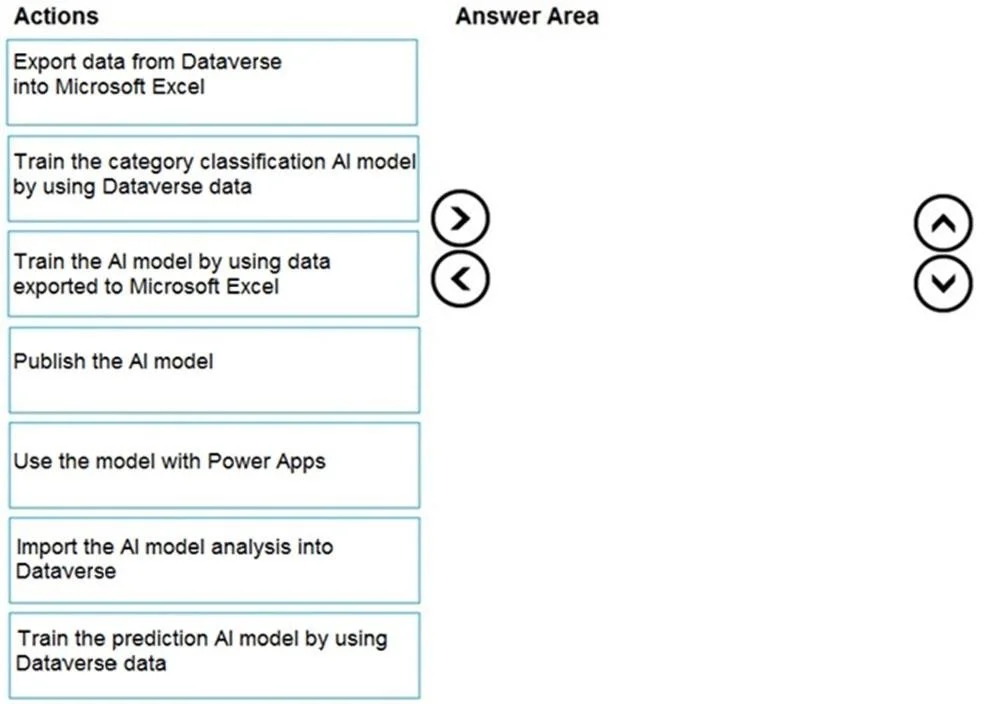
The correct answer is Train the prediction AI model by using Dataverse data; Publish the AI model; Use the model with Power Apps. The correct sequence for implementing AI Builder for sales forecasting involves training a prediction model using Dataverse, publishing it, and then integrating it with an application like Power Apps.
Question
Exhibit
Answer Area
Drag items
Correct arrangement
- Train the prediction AI model by using Dataverse data
- Publish the AI model
- Use the model with Power Apps
Explanation
The correct sequence for implementing AI Builder for sales forecasting involves training a prediction model using Dataverse, publishing it, and then integrating it with an application like Power Apps.
Approach. The scenario requires improving sales forecasting using AI Builder with data in Dataverse. This dictates a specific type of AI model and a standard development lifecycle within the Power Platform:
-
Train the prediction AI model by using Dataverse data: Sales forecasting is a classic prediction problem, aiming to estimate future outcomes (e.g., sales revenue, lead conversion likelihood). AI Builder's prediction model is specifically designed for this type of task. Since the company's sales data is stored in Common Data Service (now Dataverse), AI Builder can directly access and utilize this data for training without requiring export to external files.
-
Publish the AI model: Once an AI model is trained and validated, it must be published to make it available for use by other applications and services within the Power Platform. Publishing essentially deploys the model, making its capabilities accessible via APIs or connectors.
-
Use the model with Power Apps: After the AI model is published, it can be easily integrated into Power Apps (or Power Automate) to embed intelligent capabilities directly into business applications. For sales forecasting, a Power App could leverage the model to display predictions, guide sales representatives, or automate forecasting reports, directly addressing the company's goal of improving sales forecasting.
Common mistakes.
- common_mistake. Common mistakes stem from misunderstanding the AI Builder lifecycle, choosing the wrong model type, or misidentifying the data source requirements:
- Export data from Dataverse into Microsoft Excel / Train the AI model by using data exported to Microsoft Excel: This is incorrect because AI Builder is tightly integrated with Dataverse. Data does not need to be exported to Excel for training; AI Builder can directly consume data from Dataverse.
- Train the category classification AI model by using Dataverse data: Sales forecasting is a prediction task (often regression for numerical values or binary classification for yes/no outcomes), not a category classification task. Category classification models are used to label text into predefined categories, which is not applicable here.
- Import the AI model analysis into Dataverse: While analysis results might be stored for auditing or further processing, this is not a primary step in the core sequence of building, publishing, and consuming an AI model for a business solution. It's an optional, post-deployment consideration.
- Incorrect order: Even if the correct actions are chosen, placing them in an incorrect sequence (e.g., publishing before training, or attempting to use a model before it's published) would be wrong because the AI Builder lifecycle has a strict order: train, then publish, then consume.
Concept tested. The core concept tested is the end-to-end lifecycle of building, publishing, and consuming an AI Builder prediction model within the Microsoft Power Platform, specifically understanding how to leverage Dataverse as the data source and integrate with Power Apps for practical application.
Topics
Community Discussion
No community discussion yet for this question.