
PL-200 · Question #55
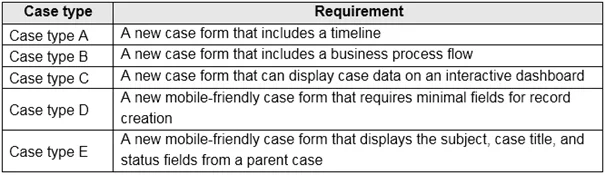
Drag and Drop Question You are a Dynamics 365 Customer Service help desk administrator. Cases entered in forms require different types of data to be stored in different types of fields. You need to…
The correct answer is main; main; card; quick create; quick view. This question assesses the test-taker's ability to match specific Dynamics 365 Customer Service case data entry requirements to the appropriate form types.
Question
Exhibits
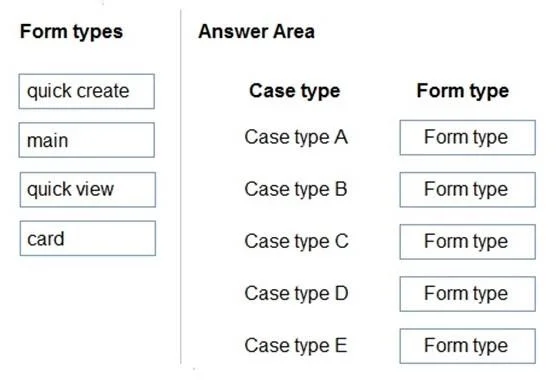
Answer Area
Drag items
Correct arrangement
- main
- main
- card
- quick create
- quick view
Explanation
This question assesses the test-taker's ability to match specific Dynamics 365 Customer Service case data entry requirements to the appropriate form types.
Approach. To answer correctly, one must understand the purpose and capabilities of each Dynamics 365 form type:
-
Case type A: 'A new case form that includes a timeline' - The 'main' form is the primary form used for detailed record viewing and editing. It supports complex controls like timelines, subgrids, and business process flows. Therefore, 'main' is the correct choice.
-
Case type B: 'A new case form that includes a business process flow' - Similar to Case A, business process flows are an integral part of guiding users through stages on a record and are typically displayed at the top of a 'main' form. Therefore, 'main' is the correct choice.
-
Case type C: 'A new case form that can display case data on an interactive dashboard' - 'Card' forms are specifically designed to display a compact, read-only summary of a record within an interactive dashboard stream. Therefore, 'card' is the correct choice.
-
Case type D: 'A new mobile-friendly case form that requires minimal fields for record creation' - 'Quick create' forms are optimized for fast and efficient record creation, often from other forms or mobile devices, by presenting only essential fields. Therefore, 'quick create' is the correct choice.
-
Case type E: 'A new mobile-friendly case form that displays the subject, case title, and status fields from a parent case' - 'Quick view' forms are used to display data from a related record (like a parent case) on the current record's form without navigating away, providing context. They are also suitable for mobile scenarios to quickly glance at related information. Therefore, 'quick view' is the correct choice.
Common mistakes.
- common_mistake. Common mistakes include confusing the specific use cases for each form type. For example:
- Assigning 'quick create' to a requirement for displaying related data, as 'quick create' is for creating records with minimal fields, not for displaying existing related data.
- Assigning 'quick view' to a requirement for a full interactive form with a timeline or business process flow, as 'quick view' forms are read-only and embedded to show related data, not for full record interaction.
- Using 'main' for displaying data on an interactive dashboard, because 'main' forms are too comprehensive for the compact display required by dashboard cards. 'Card' forms are specifically tailored for this purpose.
- Using 'card' forms for record creation or displaying detailed related data, as 'card' forms are read-only and very minimal, meant only for dashboard displays.
Concept tested. Dynamics 365 (Power Apps model-driven apps) form types and their specific functional purposes: Main forms, Quick Create forms, Quick View forms, and Card forms.
Topics
Community Discussion
No community discussion yet for this question.