
PL-200 · Question #50
Drag and Drop Question You are a Dynamics 365 for Customer Service developer. You must trigger a mobile notification whenever a specific hashtag is posted from Twitter. The notification will send…
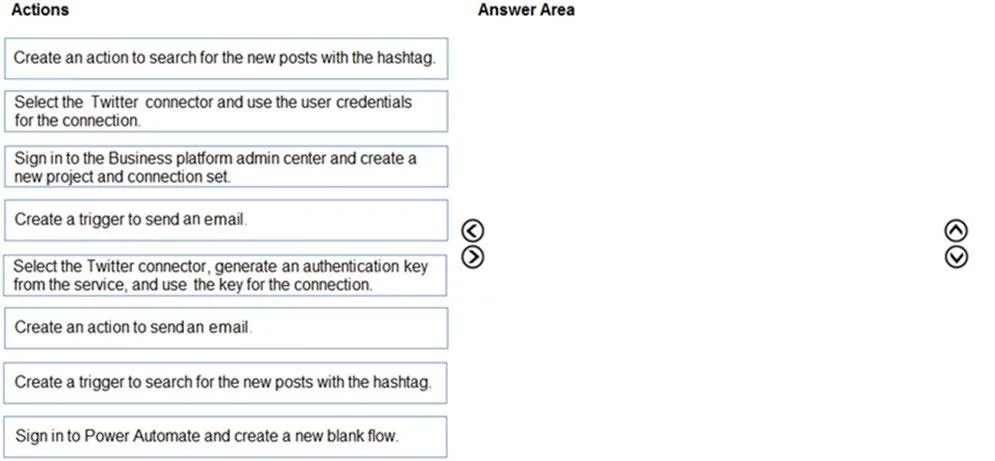
The correct answer is Sign in to the Business platform admin center and create a new project and connection set.; Select the Twitter connector and use the user credentials for the connection.; Create a trigger to search for the new posts with the hashtag.; Create an action to send an email. The correct sequence of actions for this Power Automate scenario involves setting up the development environment, establishing the Twitter connection, defining the trigger for new hashtag posts, and finally creating the email notification action.
Question
Exhibit
Answer Area
Drag items
Correct arrangement
- Sign in to the Business platform admin center and create a new project and connection set.
- Select the Twitter connector and use the user credentials for the connection.
- Create a trigger to search for the new posts with the hashtag.
- Create an action to send an email.
Explanation
The correct sequence of actions for this Power Automate scenario involves setting up the development environment, establishing the Twitter connection, defining the trigger for new hashtag posts, and finally creating the email notification action.
Approach. The scenario requires automating an email notification based on a Twitter hashtag. This task is best handled by Microsoft Power Automate, which is part of the Power Platform that integrates with Dynamics 365. The correct sequence of actions to achieve this is:
-
Sign in to the Business platform admin center and create a new project and connection set. As a Dynamics 365 developer, this foundational step involves establishing the appropriate environment or solution ('project') in the Power Platform Admin Center (PPAC) or Power Apps Maker portal where the Power Automate flow will reside. A 'connection set' (or connection reference within a solution) allows for managing connections centrally, which is good practice in enterprise development.
-
Select the Twitter connector and use the user credentials for the connection. Once the development context is set up, the next step is to establish the actual connection to the Twitter service. Power Automate uses connectors for this, and authenticating with user credentials is the most common and direct method for many services like Twitter.
-
Create a trigger to search for the new posts with the hashtag. Every Power Automate flow starts with a trigger. In this scenario, the flow needs to activate 'whenever a specific hashtag is posted from Twitter'. The 'When a new tweet is posted' trigger in Power Automate allows specifying a search term (the hashtag).
-
Create an action to send an email. After the flow is triggered by a relevant tweet, the required outcome is to 'send email to the company's social media teams distribution list'. This is an action step in Power Automate, typically using the 'Send an email (V2)' action (via the Outlook or Mail connector), configured to send to the specified distribution list.
Common mistakes.
- common_mistake. Common mistakes include choosing the wrong starting point, confusing triggers with actions, or selecting an incorrect method for connection. For instance:
- Starting with 'Sign in to Power Automate and create a new blank flow.' While this is a valid way to start creating a flow, the prompt implies a broader 'solution' context for a 'Dynamics 365 developer', making the administrative setup in the Power Platform admin center (managing environments, solutions, and connections) a more encompassing and often preferred first step in structured development.
- Choosing 'Create an action to search for the new posts with the hashtag.' Searching for posts is part of the event that triggers the flow, not a standalone action that starts the flow. The flow needs to be triggered by the occurrence of a new post matching the criteria.
- Choosing 'Create a trigger to send an email.' Sending an email is an action performed by the flow, not an event that initiates the flow. Triggers are external events or scheduled times.
- Choosing 'Select the Twitter connector, generate an authentication key from the service, and use the key for the connection.' While generating API keys is a valid authentication method for some services, using 'user credentials' is often simpler and sufficient for many Power Automate connectors unless specific security or advanced integration requirements dictate otherwise. The question does not specify using an API key.
Concept tested. This question tests the understanding of Microsoft Power Automate (formerly Microsoft Flow) fundamentals, including the lifecycle of creating a flow (administrative setup, connection management, trigger definition, and action execution), the distinction between triggers and actions, and the use of connectors to integrate with external services like Twitter and email within the Microsoft Power Platform ecosystem.
Topics
Community Discussion
No community discussion yet for this question.