
PL-200 · Question #246
Drag and Drop Question A company uses a model-driven app for customer support. The company has the following requirements for the app: - Send an email in real-time to customers when they enter their…
The correct answer is Classic workflow; Power Automate flow. This question assesses the ability to choose the correct Power Platform automation component (Classic workflow or Power Automate flow) based on specific real-time event-driven versus scheduled recurrence requirements for a model-driven app.
Question
Exhibit
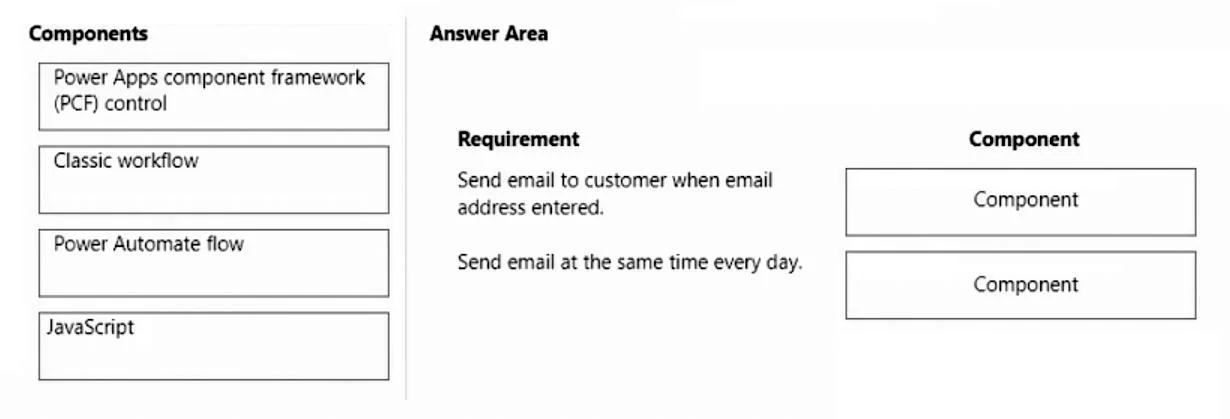
Answer Area
Drag items
Correct arrangement
- Classic workflow
- Power Automate flow
Explanation
This question assesses the ability to choose the correct Power Platform automation component (Classic workflow or Power Automate flow) based on specific real-time event-driven versus scheduled recurrence requirements for a model-driven app.
Approach. To answer this question correctly, the test-taker must match the automation requirements with the most suitable Power Platform component, considering the 'least amount of customization' constraint.
-
Requirement: 'Send email to customer when email address entered.'
- This requirement specifies a real-time, event-driven action triggered by data entry in a model-driven app. A 'Classic workflow' (also known as a Dataverse workflow) is an ideal choice for this. Classic workflows can be configured to run synchronously or asynchronously when a record is created, updated, or deleted. They are directly integrated into the Dataverse environment and can easily send emails based on changes to fields like an email address, requiring minimal configuration within the solution.
-
Requirement: 'Send email at the same time every day.'
- This requirement specifies a scheduled, recurring action. 'Power Automate flow' (specifically a cloud flow with a recurrence trigger) is designed precisely for this purpose. A Power Automate flow can be configured to run daily at a specific time, query for cases that meet the criteria (open for more than 24 hours), and then send emails, making it the most straightforward and least customized solution for scheduled tasks.
Therefore, 'Classic workflow' should be dragged to the first requirement, and 'Power Automate flow' should be dragged to the second requirement, as shown in the second exhibit image.
Common mistakes.
- common_mistake. 1. Using Power Apps component framework (PCF) control: PCF controls are for enhancing the user interface with custom visualizations and interactions, not for backend business logic like sending emails or performing scheduled tasks. Dragging this to either requirement would be incorrect.
- Using JavaScript: JavaScript in model-driven apps is primarily for client-side scripting, form manipulation, and validation (e.g., showing/hiding fields, making fields mandatory). While it could potentially trigger an email sending process via an API call, it is not the standard or 'least customization' approach for direct email sending based on data changes or for scheduled background tasks. It's usually for UI-specific logic, not core business process automation.
- Swapping 'Classic workflow' and 'Power Automate flow': Using Power Automate for the real-time 'email entered' requirement is technically possible using a 'When a row is added, modified or deleted' Dataverse trigger. However, Classic workflows are often simpler and more integrated for synchronous, in-app, event-driven tasks. Conversely, a Classic workflow cannot natively trigger on a daily schedule without external orchestration, making it completely unsuitable for the 'send email at the same time every day' requirement. Power Automate's recurrence trigger is explicitly designed for this. Misunderstanding the primary use cases and trigger mechanisms of these two automation tools is a common mistake.
Concept tested. The core technical concept being tested is the ability to differentiate and correctly apply the appropriate Power Platform automation tools-specifically Classic Workflows versus Power Automate flows-based on their trigger mechanisms (event-driven vs. scheduled) and execution characteristics (real-time/synchronous vs. recurring/background) within a model-driven app context, with an emphasis on choosing the solution requiring the 'least amount of customization'.
Topics
Community Discussion
No community discussion yet for this question.