
PL-200 · Question #244
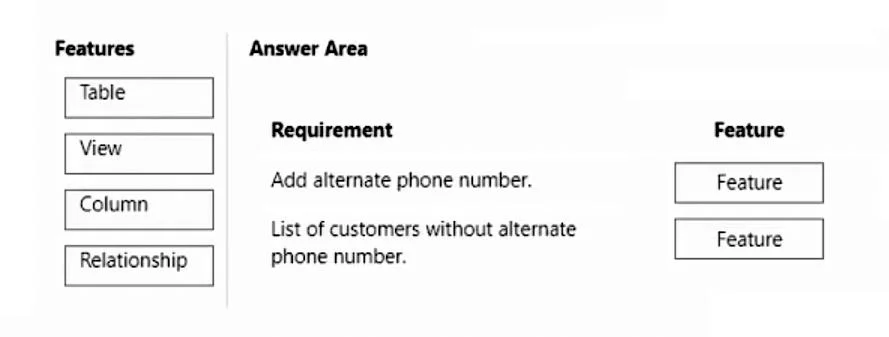
Drag and Drop Question A company has a model-driven app that uses Microsoft Dataverse. Users need to add an alternate phone number when entering their account information. The users also require a…
The correct answer is Column; View. To add a new data field like an alternate phone number, a Column is used, and to display a filtered list of records, a View is required.
Question
Exhibit
Answer Area
Drag items
Correct arrangement
- Column
- View
Explanation
To add a new data field like an alternate phone number, a Column is used, and to display a filtered list of records, a View is required.
Approach. For the first requirement, 'Add alternate phone number.', the correct feature is 'Column'. In Microsoft Dataverse and model-driven apps, a 'Column' (also known as a field or attribute) is used to store a specific piece of data for a record within a table. Adding an 'alternate phone number' means adding a new data point to the existing account information, which is precisely the function of a column. For the second requirement, 'List of customers without alternate phone number.', the correct feature is 'View'. A 'View' in Dataverse allows you to define a specific query or filter on a table to display a subset of records that meet certain criteria, along with selected columns. To get a list of customers based on a condition (having or not having an alternate phone number), a view is the appropriate tool to define and present this filtered list.
Common mistakes.
- common_mistake. Using 'Table' would be incorrect because a table is a collection of rows (records) and columns (fields) that stores a specific type of data (e.g., Accounts). You would not create an entirely new table just to add a single alternate phone number to an existing account record; you would add a column to the existing account table. Using 'Relationship' would also be incorrect for adding a simple alternate phone number directly to account information. While relationships define how tables are linked, adding a singular data point like an alternate phone number to an existing entity usually involves adding a column, not defining a new relationship (unless multiple alternate numbers with complex structures were required, which is not implied here). Confusing 'Table' or 'Relationship' for 'Column' when extending an existing data model, or for 'View' when needing to filter and display data, are common errors.
Concept tested. Core components and data modeling principles within Microsoft Dataverse and Power Apps model-driven apps, specifically understanding the purpose of Tables, Columns, Views, and Relationships.
Topics
Community Discussion
No community discussion yet for this question.