
PL-100 · Question #44
Drag and Drop Question You are an app builder for a medical office. The medical office uses activities to book appointments and business process flows to track patient status. The cleaning staff…
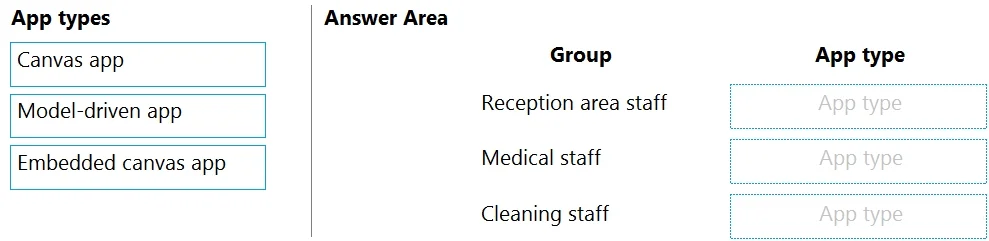
The correct answer is Model-driven app; Model-driven app; Canvas app. The question tests the ability to differentiate between Canvas apps and Model-driven apps based on user requirements, data sources, and desired user experience, specifically in the context of a medical office scenario.
Question
Exhibits
Answer Area
Drag items
Correct arrangement
- Model-driven app
- Model-driven app
- Canvas app
Explanation
The question tests the ability to differentiate between Canvas apps and Model-driven apps based on user requirements, data sources, and desired user experience, specifically in the context of a medical office scenario.
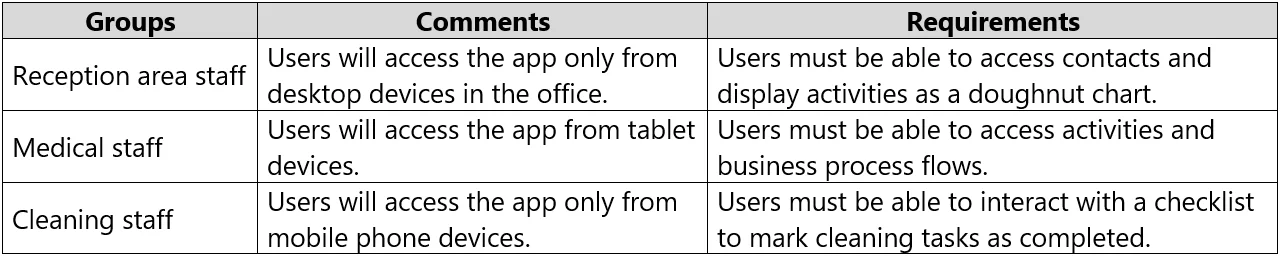
Approach. 1. Reception area staff - Model-driven app: This group needs to access contacts and display activities as a doughnut chart, primarily from desktop devices. Contacts and activities are standard Dataverse entities, and Model-driven apps are inherently built on Dataverse, providing rich, responsive forms, views, and dashboards (including charts like doughnut charts) out-of-the-box with minimal configuration. The requirement for 'no customizations' strongly points to leveraging the declarative, pre-built capabilities of a Model-driven app for standard CRM-like functionalities. 2. Medical staff - Model-driven app: This group requires access to activities and business process flows, primarily from tablet devices. Activities and business process flows are core components of Dataverse and are fully supported and seamlessly integrated within Model-driven apps. Model-driven apps are responsive and adapt well to various screen sizes, including tablets, making them suitable for this requirement while adhering to the 'no customizations' constraint. 3. Cleaning staff - Canvas app: This group needs to interact with a checklist to mark cleaning tasks as completed and, critically, 'connect directly to a Microsoft Excel workbook' for tracking. Canvas apps are highly flexible regarding data sources, including direct connections to Excel workbooks stored in SharePoint or OneDrive. They also offer pixel-perfect control over the user interface, allowing for the creation of a custom checklist experience optimized for mobile phone devices, which is a key requirement for this group.
Common mistakes.
- common_mistake. 1. Using 'Embedded canvas app': An Embedded canvas app is not a standalone application type. It is a Canvas app designed to be embedded within a Model-driven app form or dashboard to extend its functionality with highly customized UI or external data. None of the user groups require embedding a custom experience within another app; they require a primary, standalone app experience. Therefore, 'Embedded canvas app' is an incorrect choice for all groups.
- Using 'Canvas app' for Reception or Medical staff: While Canvas apps can connect to Dataverse, building a comprehensive app to manage contacts, activities, business process flows, and display charts from scratch would require significant development and customization. The question explicitly states 'Apps must not require customizations', making Model-driven apps a more appropriate choice as they offer these features declaratively and out-of-the-box when built on Dataverse.
- Using 'Model-driven app' for Cleaning staff: A Model-driven app primarily leverages Dataverse and is not designed for direct, interactive operational use with an Excel workbook as its primary data source for a checklist. While Dataverse can integrate with Excel for reporting or data import, the specific need to 'connect directly to a Microsoft Excel workbook' for a dynamic checklist is a strong indicator for a Canvas app due to its flexible data source connections and customizable UI capabilities.
Concept tested. Understanding the fundamental differences and appropriate use cases for Canvas apps, Model-driven apps, and Embedded canvas apps within the Microsoft Power Platform, based on specific user requirements, device types, desired user experience, data source connectivity, and development constraints like 'no customizations'.
Topics
Community Discussion
No community discussion yet for this question.